

If you have worked with Vault for a while, you may have noticed that certain data is specific to a vault and some data applies to all vaults. I'll refer to the second type as System Data.
As much as I hate to go into the database details, it's the only way to fully understand this topic. Each vault gets its own database, but there is also another database, called KnowledgeVaultMaster (KVM), which manages all the vaults. This database design is what distinguishes between system data and vault data. If it's in the KVM, it's system data. If it's in a Vault database, it's vault data. That's the critical difference, and it shows itself in many aspects of the Vault framework.
One of the more obvious places is the Administration sub-menu in Vault Explorer. There are two options, one for vault-specific data and one for system data (aka. global data). 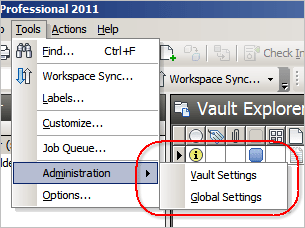
Another example is the SignIn and SignIn2 functions in the SecurityService. The first one is for logging in to a specific vault database and the second one is for logging in to the KVM.
If you are in a replicated environment and you want to get admin ownership, you need to call GetDatabaseOwnership and specify if you want to own a vault database or the KVM.
Here is a basic breakdown of which data is in which database.
Vault-specific data:
- Files
- Folders
- Items
- Change Orders
- Properties
- Categories
- Lifecycles
- ACLs
- Jobs
System data:
- Users
- Groups
- Roles
- Job Queue
The job queue is a weird one. The queue itself is maintained by the KVN, but each job is associated to a specific vault. So you need to be logged in to a vault to add the job, but you can be logged in to the KVM for reading the queue. If you are viewing the job queue in Vault Explorer, you are seeing jobs from all vaults. 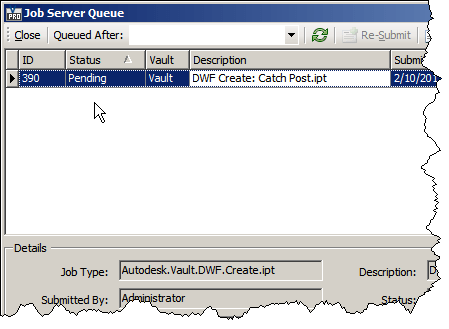
You can customize the columns if you want to show the associated vault.
Leave a Reply