

Update: The Vault 2012 version of this app is now available.
Q-Tools for Autodesk Vault is my attempt to fix job server issues that I have heard about or experienced myself. The utility is a Windows service that contains various features that you can turn on or off depending on how you want to use the job queue. It's best if I just talk about the features themselves.
Feature – Logging
Q-Tools logs everything it determines is an "issue". You have some flexibility on defining what an issue is. More on that later.
If you are in a multi-site environment, Q-Tools will provide a single log for all queues. Logging is the only feature that you can't turn off.
Feature – Stale Job Detection
If a job has been on the queue for a long time, you can set Q-Tools to consider this an issue. A lot of times these "stale jobs" mean that there is an issue with the job processor or a client queued jobs that have no handlers.
Feature – Email Reports
You can configure Q-Tools to send out an email, listing all the issues it detected. 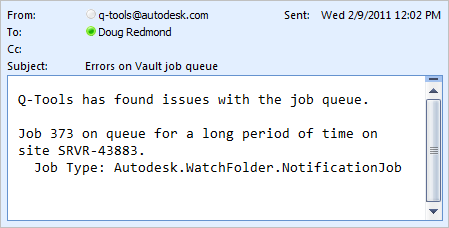
Feature – Queue Cleanup
If there is an job on the queue in the error state, Q-Tools can automatically log and delete it for you. You can configure it so that only certain job types get cleaned up this way.
Feature – Queue Forwarding
In a multi-site environment each site gets its own queue. If you would rather have one queue for all sites, Q-Tools can make this happen by letting you designate a "central queue". All jobs from other queues are forwarded to the central queue.
Requirements:
– Vault Workgroup/Collaboration/Professional 2011
– Job Server feature enabled
Click here to download the application
Click here to download the source code
To setup:
- Designate a computer on the network that the Q-Tools service should run on. Only 1 Q-Tools can be running for a given Vault deployment.
- Run the installer.
- Go to the installation folder and update the settings.xml. The XML comments will explain this step.
- Run the Q-Tools service.

As with all the samples on this site, the legal disclaimer applies.



Leave a Reply