

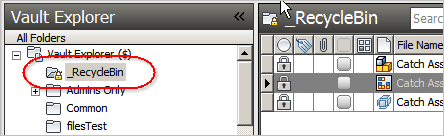
Armed with the new capabilities in the Vault 2011 APIs, I decided to re-design the Recycle Bin application. The result is closer to how things work in Windows. The Recycle Bin is now an actual folder and you delete things by putting them into the Recycle Bin.
Also, I bundled in the Restore Recycled app too.

Features:
- No more permanent deleting of files. Instead, files go into the Recycle Bin where they are backed up to another vault.
- Files accidently moved into the Recycle Bin can be recovered using the Restore From Recycle Bin command.
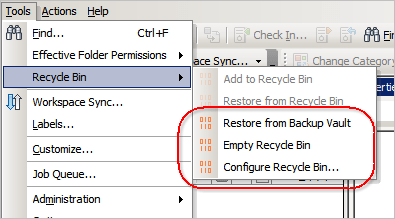
- The Empty Recycle Bin admin command backs up files and deletes them from the main Vault.
- Files can be easily recovered from the backup Vault via the Restore From Backup admin command.
Requirements:
- Vault Workgroup 2011, Vault Collaboration 2011, or Vault Professional 2011.
| NOTE: This isn't something you can just download and run. The Vault administrator needs to configure some settings before this feature can be used. |
Click here to download the application
Click here to download the source code
User Setup:
Once the administrator has configured the system properly, the Recycle Bin is ready to be used.
- Run the installer and select "no" when asked to install the administrator controls.
- To add file or folder to the Recycle Bin, right-click and select "Add to Recycle Bin"
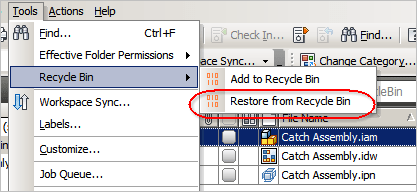
- If you accidently put something into the Recycle Bin, you can recover it. Just select the object and run Tools -> Recycle Bin -> Restore from Recycle Bin from the menu.
Administrator Setup:
The Vault administrator must first configure the system.
- Run the installer and select "yes" when asked to install the administrator controls.
- Run the ADMS Console and create a new vault, which will be the location that files go when the Recycle Bin is emptied.
- Exit the ADMS Console.
- Run Vault Explorer.
- Create a new user which will be used to run Recycle Bin commands. This user needs to be and administrator and have access to the main vault and the backup vault.
- Create a folder to be used as the Recycle Bin folder.
- Under the Tools menu, select Recycle Bin -> Configure Recycle Bin.
- Fill in the necessary information and click OK.
- Refresh your folder tree and you should see a lock icon next to the Recycle Bin folder.
- Use folder security to remove delete permissions from folders where you have sensitive information.
- Inform vault users that the Recycle Bin utility is required to delete files or folders.
Some screenshots of administrator commands…


Leave a Reply to activeliveCancel reply