The Recycle Bin 2.0

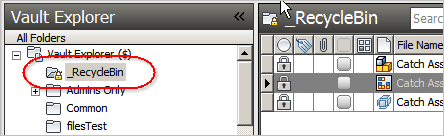
Armed with the new capabilities in the Vault 2011 APIs, I decided to re-design the Recycle Bin application.  The result is closer to how things work in Windows.  The Recycle Bin is now an actual folder and you delete things by putting them into the Recycle Bin.
Also, I bundled in the Restore Recycled app too. 

Features:

  • No more permanent deleting of files.  Instead, files go into the Recycle Bin where they are backed up to another vault.
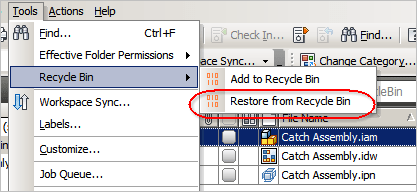
  • Files accidently moved into the Recycle Bin can be recovered using the Restore From Recycle Bin command.
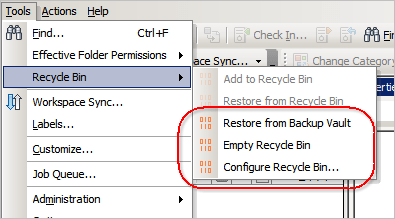
  • The Empty Recycle Bin admin command backs up files and deletes them from the main Vault.
  • Files can be easily recovered from the backup Vault via the Restore From Backup admin command.

Requirements:

  • Vault Workgroup 2011, Vault Collaboration 2011, or Vault Professional 2011.
NOTE:  This isn't something you can just download and run.  The Vault administrator needs to configure some settings before this feature can be used.

Click here to download the application
Click here to download the source code

User Setup:
Once the administrator has configured the system properly, the Recycle Bin is ready to be used.

  1. Run the installer and select "no" when asked to install the administrator controls.
  2. To add file or folder to the Recycle Bin, right-click and select "Add to Recycle Bin"
  3. If you accidently put something into the Recycle Bin, you can recover it.  Just select the object and run Tools -> Recycle Bin -> Restore from Recycle Bin from the menu.

Administrator Setup:
The Vault administrator must first configure the system.

  1. Run the installer and select "yes" when asked to install the administrator controls.
  2. Run the ADMS Console and create a new vault, which will be the location that files go when the Recycle Bin is emptied.
  3. Exit the ADMS Console.
  4. Run Vault Explorer.
  5. Create a new user which will be used to run Recycle Bin commands.  This user needs to be and administrator and have access to the main vault and the backup vault.
  6. Create a folder to be used as the Recycle Bin folder.
  7. Under the Tools menu, select Recycle Bin -> Configure Recycle Bin.
  8. Fill in the necessary information and click OK. 
  9. Refresh your folder tree and you should see a lock icon next to the Recycle Bin folder.
  10. Use folder security to remove delete permissions from folders where you have sensitive information.
  11. Inform vault users that the Recycle Bin utility is required to delete files or folders.

Some screenshots of administrator commands…


Comments

21 responses to “The Recycle Bin 2.0”

  1. Ezio Grasselli Avatar
    Ezio Grasselli

    Hi,
    I’ve an error running “Configure Recycle Bib”
    Error 160 – ID not valid
    “Recycle Bin User Server:” not accept any value name server or ip
    Regards

  2. I can’t reproduce on my end, so I need some more information.
    What Vault product are you using?
    When exactly does error 160 pop up? Is it when you click the “OK” button on the Configure Recycle Bin dialog?
    The Recycle Bin User Server cannot be “localhost” or “127.0.0.1”, but it should accept all other values. What value are you trying to set?

  3. Ezio Grasselli Avatar
    Ezio Grasselli

    VauultPro 2011 ITA update-1
    when i clik “OK”
    “Errore 160” is the title of pop-up
    “ID non valido” is inside of pop-up
    Folder: $/_Cestino
    Name: AppRecycleBin
    Pass: 12345
    Server: PC-WIN7
    Backup: MioVAULTbck
    The same error on Win7 x64 client/server
    and XpPro client / Server2003 R2 server
    Localized ITA System Operator and/or Vault,
    can create problems?
    Regards

  4. I think I have it fixed. The download links have been updated to point to the new version, 2.0.2.0.

  5. Error: System.Web.Services.Protocols.SoapExceptions: 311… Error received upon attempt to send any file to recycle bin. I did configure the recycle bin Vault & the recycle bin feature within Vault Explorer.

  6. All the Vault errors come from the server as error codes and none of my sample apps translate the codes into human readable messages. So you have to look up the codes yourself in the SDK documentation.
    Error 311, means that the application using the wrong authentication type. The user you use to run Recycle Bin cannot be an Active Directory user.

  7. You were right about the Active Directory user problem. I had configured Recycle Bin to use my own user name and password. I have since configured it to use a Vault user name and password. Now I’m having a problem where when I try to add a file to the recycle bin the GetManafest method is throwing an error “Cannot check out now. (MachineName) is currently performing a recycle bin operation.” What are some troubleshooting steps to resolve this type of problem?

  8. In Vault Explorer, turn on the setting that allows you to view hidden files. You will see a file called RecycleBinManifest.xml in the Recycle Bin folder. Undo the checkout on the file and that should fix things. You may need to give yourself edit permissions in the Recycle Bin folder.
    If you want more technical details, see http://justonesandzeros.typepad.com/blog/2010/07/storing-custom-data-hidden-files.html

  9. activelive Avatar
    activelive

    Hi Doug Redmond
    Can you enable the option restore from RecycleBin for use?
    Or disable the delete command when install it for administrator?
    Thanks

  10. activelive Avatar
    activelive

    Hi Doug,
    About my question above, would you mind to disable delete command when right-click on file or folder in vault when installed recycle bin app?
    Thanks.

  11. The “Restore from Recycle Bin” command should be enabled for all users. The “Restore from Backup Vault” is designed for admins only.
    For non-admins the Delete command is removed, but not for admins. If you want to remove it from admin too, you would need to edit the source code.
    You can also block deletes using folder security. So the command will still be there, but the operation will fail.

  12. activelive Avatar
    activelive

    Hi Doug, thanks for your quick reply.
    Would you mind to edit the source code for the confirm when choose move to recycle bin? And remove the Delete command for admins.

  13. Sorry, I don’t have time to be adding or changing features in my sample applications.
    If you or somebody you know can program, feel free to edit the source code to your needs.

  14. activelive Avatar
    activelive

    Ok, i’ll try it >.<
    Thank for all, Doug

  15. Hi Doug,
    I was watching the Webinar and collected all the information about the good/bad in the sample application.
    I was wondering if the reroute of the “Deleted Files” to the “Backup Vault” would not cure a lot of the problems.
    If the files would be placed in the BackupVault in Folders with a Date and Time stamp it would cure the file naming topic.
    Maybe we can have another discussion about tips on the phone during the next weeks – Please let me know when I can call you – Thank you

  16. Yes, that would fix many of the issues, but it would also not be a recycle bin at that point. One feature I liked in both Recycle Bin 1.0 and 2.0 is that if you accidentally put something in the bin, you can easily get it back before the bin is emptied.

  17. David Prontnicki Avatar
    David Prontnicki

    Hi Doug,
    Quick Question; when review the comments I noticed you stated that it would NOT work with active directory users. Is this true. Our current Vault set-up utilizes users by active directory/windows accounts. Does this mean we can not use this?
    Thanks,

  18. David Prontnicki Avatar
    David Prontnicki

    Hi Doug,
    Also does this work with 2014? I cant seem to install it.

  19. No, it doesn’t work with 2014. I was never very happy with how the app turned out, so I didn’t update it past Vault 2011. Recycle Bin was buggy and didn’t work in some Vault configurations.
    The source code is available, so it is possible for somebody with programming knowledge to update the app for a later version of Vault.

  20. Hi Doug,
    I have a short question about the version 2.0.2.0 source code package. Where can I finde the ReplUtil class? Seems to be missing in the package and I can’t find it anywehre. Maybe you have the file somewhere or give me just a snippet of the functions GrabEntityOwnership and GrabFolderOwenrship. Many thanks in advance.

  21. It looks like I left out a project when I uploaded the source code. You can download the missing project from here: http://justonesandzeros.typepad.com/Apps/JustOnesAndZerosWebServices/JustOnesAndZeros.WebServices.zip.abc
    Remove the extension “.abc” and unzip. It should have all the missing source files.

Leave a Reply to Mark WCancel reply

Discover more from Autodesk Developer Blog

Subscribe now to keep reading and get access to the full archive.

Continue reading