
Update:  Q-Tools 2013 is now available.

Note:  Click here for Q-Tools 1.0.

Here is Q-Tools 2.0.  I updated it for Vault 2012 and hopefully fixed the multi-site issues.  I also added, by request, the ability to email multiple addresses when errors are detected.
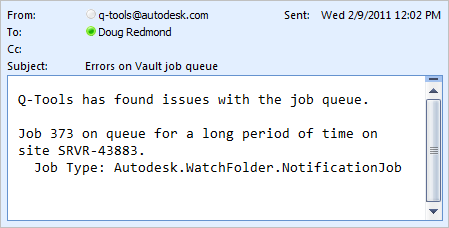
Here is the full feature list:

  • Logging – Issues are logged to a text file.
  • Stale Job Detection – Jobs on the queue too long can be considered an issue.
  • Email Reports – Issues can be emailed to one or more recipients.
  • Queue Cleanup – Jobs with issues can be automatically removed from the queue.
  • Queue Forwarding – In multi-site and multi-workgroup environments, jobs can get routed to a single site.

Requirements:
– Vault Workgroup/Collaboration/Professional 2012
– Job Server feature enabled

Click here to download the application
Click here to download the source code


To setup:

  • Designate a computer on the network that the Q-Tools service should run on.  Only 1 Q-Tools can be running for a given Vault deployment.
  • Run the installer.
  • Go to the installation folder and update the settings.xml.  The XML comments will explain this step.
  • Run the Q-Tools service.

As with all the samples on this site, the legal disclaimer applies.


Comments

9 responses to “Q-2ools”

  1. Scott Moyse Avatar
    Scott Moyse

    Doug,
    can you reply to this Q-2ools related message please? http://forums.autodesk.com/t5/Autodesk-Vault/bd-p/101
    I thought i would post here in case you didn’t see it on the boards.
    cheers
    scott.

  2. How about I answer it right here? The discussion groups are acting very buggy right now.
    Yes, you can install Q-Tools on the ADMS server. It can actually be installed anywhere on the network as long as it can connect to all the Vault sites.

  3. Scott Moyse Avatar
    Scott Moyse

    cheers doug. The groups have been like that for 12 hours now.

  4. Neil Cross Avatar
    Neil Cross

    Doug – I saw a post from you from back last year saying that the tool was only designed to run on a multi-workgroup environment. We have a filestore only replicated environment, has this tool been updated recently to cater for that? Reason I ask is that the Q-Tools service won’t start unless I chose false to having a central queue.

  5. First, check your version. If you don’t have version 2.0.2.0 then you can download it from the links in this post.
    If that’s not the problem, send me your settings.xml file. It’s probably best to post it to the Vault Customization newsgroup:
    http://forums.autodesk.com/t5/Autodesk-Vault-Customization/bd-p/301
    Just make sure to clear out any important data, such as passwords.

  6. Scott Taylor Avatar
    Scott Taylor

    Hi,
    We have a multi site replicated vault environment and your application look like it will solve our job processor issues. I have installed and set-up so that we have one central job queue, I am running into an issue that when the job processor runs I am getting an error stating that the file is locked. I suspect this is because the server the job queue is running on is not the “owner” of the file? do you have any thoughts of how to resolve this?
    Thanks

  7. In Vault 2013, we put in a feature that should automatically switch ownership when possible.
    In Vault 2012, fixing this issue requires custom programming. You need to either modify QTools or create your own tool to transfer file ownership.

  8. Klaus Loerincz Avatar
    Klaus Loerincz

    Hi Doug,
    what do I have to do to make it work for 2015/2016 Vault ?

  9. It should be fairly easy to update this app since it’s not a plug-in. Here are the basic steps:
    1. Download the source code.
    2. Open the project in the latest Visual Studio version.
    3. Set the references to the 2015 or 2016 Vault SDK DLLs.
    4. Fix any compile errors that may arise from changed APIs. See the “Changes” pages in the SDK documentation.

Leave a Reply to Scott MoyseCancel reply

Discover more from Autodesk Developer Blog

Subscribe now to keep reading and get access to the full archive.

Continue reading