


Vault 2015 has just been released. Here is a quick breakdown of what’s new and what’s changed in the API. Overall, these changes are reactions to changes in the Vault product itself. There’s nothing new here specific to API developers.
Edited out of Turn enhancements
Vault has changed how it handles changes to files that have not been checked out. It used to show an “edited out of turn” icon. In 2015, the status now matches the status of the last downloaded state of the file (before the local edits). An extra piece of information is provided indicating the “dirty” status of the local file. This data is available through the UI and API.
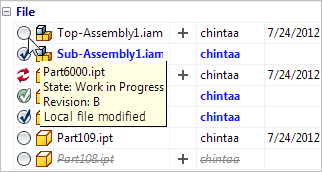
When acquiring a file in this “dirty” state, the download will not proceed unless a “force override” option is applied. This override can be done through both UI and non-UI workflows in the API.
Item BOM updates
There have been changes to the BOM workflows. A lot of these changes are around being able to add items first and easily hook to files later on. Previous releases favored file-first workflows. Another workflow change is the ability to promote only part of a BOM, instead of being an “all or nothing” operation.
There are also some new concepts, such as “on” and “off” BOM rows.
Vault 2012 clients are no longer compatible
You will not be able to use any of your Vault 2012 clients with Vault 2015 server. This includes CAD applications (like AutoCAD 2012 and Inventor 2012), Vault 2012 SharePoint integration, custom apps, etc.
Compatibility with 2013 and 2014 clients*
Vault 2013 and 2104 clients are compatible with Vault 2015 server.
- Calls to the Item and Package service will result in a runtime error. This is due to breaking changes to the Item BOM workflows. If your app is using either of these services, you should update to the 2015 SDK.
.NET 4.5
SDK DLLs are built against .NET 4.5. Visual Studio 2012 is the recommended development environment.


Leave a Reply