Watch Folder 2012

Update:  Watch Folder 2013 is now available.

Looking for that perfect gift to give this year?  Why not give the gift of Watch Folder?!  I just updated it to work with Vault 2012, and I added in support for HTML style emails.

In case you aren't familiar with it, Watch Folder is an app that allows you to "watch" a set of Vault folders so that you receive email notifications when files get added or updated in those folders. 


Requirements:

  • Vault Workgroup/Collaboration/Professional 2012
  • Job Server enabled
  • An SMTP server somewhere on the network

NOTE:  This isn't something you can just download and run.  The Vault administrator needs to set up some server components before this feature can be used.

Click here to download the application
Click here to download the source code

Click here for the 2.0.3.0 hotfix – Applies only to the Job Processor component.


To use

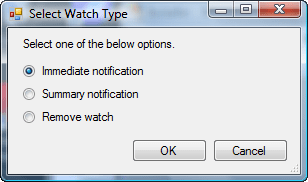
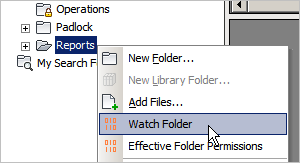
For Vault users, download the application and run the installer.  Just make sure that the administrator has set up the Vault environment first.  Next, start up Vault Explorer and right-click on a folder that you want to watch.  Select the Watch Folder command and decide how frequently you want notifications.

For Vault administrators, download the application and run the installer.  Next follow the instructions in the readme file in the install folder (%ProgramData%\Autodesk\Vault 2012\Extensions\WatchFolderCommand).

Notes:

  • A watch on a folder will automatically apply to any sub-folders.
  • Removing a watch will also remove watches on sub-folders.
  • You can't have an immediate watch and a summary watch on the same folder.  Setting a folder to one type overwrites the existing setting.
  • You need to be at least Document Editor (level 1) in order to set up a watch on a folder.
  • You need to have a valid email address in your Vault user settings.
  • The contents of the email can be customized by the Vault administrator.  See readme file.

Migrating from version 1:

  • The admin install is still a lot of steps.  I did a bit of consolidation, the Job Processor plug-in and the Vault Explorer plug-in have been combined.
  • All the settings files from R1 can still be used, just copy over WatchCollection.xml, WatchSettings.xml and WatchEmailBody.txt over to the install folder.
  • I recommend updating WatchSettings to use an HTML file instead of a text file.  There are more formatting options and you can have hyperlinks.
  • More file informaiton can be provided in the email.  See readme for more details.

As with all the samples on this site, the legal disclaimer applies.


Comments

13 responses to “Watch Folder 2012”

  1. Hi, Doug
    Excellent gift for christmas, thank you!!

  2. Hi Doug,
    i installed watch folder 2012, and edited the jobprocessor.exe.config like you described in your readme, when i start the jobserver and check the jobtypes, there are only the default jobtypes listed.
    In the jobprocessor.log i get the following error:
    Error 6/12/2012 6:30:03 PM
    Value cannot be null.
    Parameter name: key
    Exception: System.ArgumentNullException: Value cannot be null.
    Parameter name: key
    at System.ThrowHelper.ThrowArgumentNullException(ExceptionArgument argument)
    at System.Collections.Generic.Dictionary`2.FindEntry(TKey key)

    at JobProcessor.HandlerManager.LoadHandlerTypes()

    could you help me?

  3. Sorry, I think there is a typo in the readme.
    The assembly “WatchFolderJobHandler” was renamed to “WatchFolderCommand” and I don’t think everything was updated.
    Try using these settings in JobProcessor.config.exe:
    <jobHandler class=”Autodesk.WatchFolder.SettingJob” handler=”WatchFolderCommand.HandlerClass, WatchFolderCommand”/>
    <jobHandler class=”Autodesk.WatchFolder.NotificationJob” handler=”WatchFolderCommand.HandlerClass, WatchFolderCommand”/>

  4. MaxU77 Avatar
    MaxU77

    Serches could be saved as folders, right?
    Could WatchFolder be used to subscribe to folder-type search results changes? Or if there any other way to achieve the desired?
    Thanks in advance.

  5. MaxU77 Avatar
    MaxU77

    BTW, could “Check watch folder …” jobs have particular (higher then DWF creation) priority?

  6. MaxU77 Avatar
    MaxU77

    Couple issues found:
    1. Subject shows only “N” while it is left default in WatchSettings.xml
    2. Link that is included in message fails to open because of Cyrrilic chars that Russian Vault creates by default.

  7. No. Saved searches are not real folders, they just look that way. Saved searches are stored client-side, so there is no easy way to do achieve you want.

  8. Yes, if you want to edit the source code. Just change the calls to AddJob.

  9. Interesting. Can you post an example of these links? Thanks.

  10. MaxU77 Avatar
    MaxU77

    Have posted them and some more info to your corporate mail.

  11. MaxU77 Avatar
    MaxU77

    btw, I’m getting no notifications when you answer here….

  12. Max Bodnar Avatar
    Max Bodnar

    Hi Doug
    I am wondering if watch folder could be used to monitor users doing a get of files in a folder?
    Thanks
    Max Bodnar

  13. No. Vault doesn’t track downloads, so there is no way for an app to query for that information.

Leave a Reply

Discover more from Autodesk Developer Blog

Subscribe now to keep reading and get access to the full archive.

Continue reading