

Update: vLogic 2013 has been released.
As promised, I came up with something for those of you who want to customize Vault through the use of scripts. I decided to use PowerShell as the scripting engine since it has a lot of tools ready-to-use for this sort of thing. If you are not familiar with PowerShell, you can find tons of information on the internet, including the Microsoft web site.
vLogic Features:
- No Visual Studio required to write custom commands.
- No compile step.
- No deploy step.
- Commands can be updated without having to exit Vault Explorer.
- Easy to share scripts or modify scripts from others.
Requirements:
- Vault Workgroup/Collaboration/Professional 2012
- Windows PowerShell (should already be part of your OS)
Click here to download the application
Click here to download the source code
To use:
Run the install and start Vault Explorer.
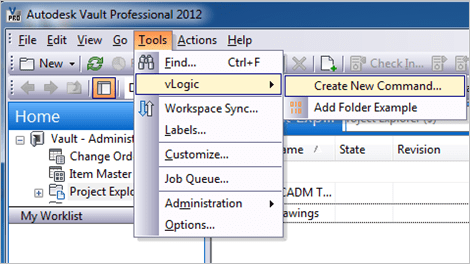
Under the Tools menu is the vLogic menu. This is where you can run existing scripts or create new scripts.
To create a new script, select Create New Command from the vLogic menu. After giving your script a name, you will have to re-start Vault Explorer. When the program re-starts, your command should show up in the vLogic menu.
To edit a script, hold the shift key and click on the command. The PowerShell ISE should pop up, allowing you to edit the script while Vault Explorer is running. When you are done with your changes, save the file in the editor.
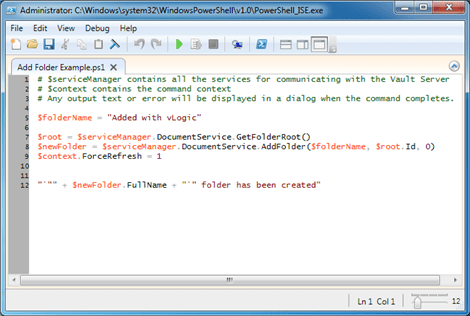
To run a script, run the command from the vLogic menu.
To delete a script, go to %ProgramData%\Autodesk\Vault 2012\Extensions\vLogic and remove the .ps1 file. You can also add commands by putting .ps1 files in this folder.
There are some downsides to vLogic. If you are not familiar with PowerShell, then it’s basically a new language that you have to learn. If you have complex operations or UI, then you are better off using Visual Studio. As this moment, I have no good story for debugging a vLogic script.
This is just my first pass at adding scripting to Vault. There is lots of room for improvement for future releases.
As with all the samples on this site, the legal disclaimer applies.


Leave a Reply