

Update: The Vault 2012 version is available.
Here is a simple app which uses a custom tab view. Vault Web View is an Internet Explorer control with a URL that is set on a folder by folder basis. This is useful if you have data that is not in Vault, but is accessible through a browser.

(click image to see full size)
Requirements:
Vault Workgroup/Collaboration/Professional 2011
Click here to download the application
Click here to download the source code
To use:
Run the installer.
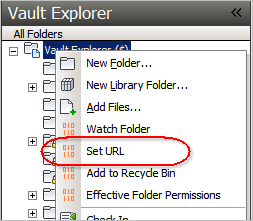
Right-click on a folder and run the "Set URL" command to set the URL for the folders you want an active Web View tab.
Notes:
You need to be an administrator to set the URL on a folder.
There are some special strings you can put in the URL which will get replaced at runtime:
#FILENAME# – Gets replaced with the name of the currently selected file.
#FOLDERID# – The ID of the current folder.
#SERVER# – The server name.



Leave a Reply