
Vault Mirror holds a special place in my heart.  It's the first utility I ever released publicly, and it was one of the first utilities to be featured on Autodesk Labs.  It took me only a few hours to write, and I figured it would have a short lifetime. 

Much to my delight, the utility is still in use today by many people, and in ways that I never imagined.  Brian Schanen has already blogged about this, but I want to add my own technical perspective.
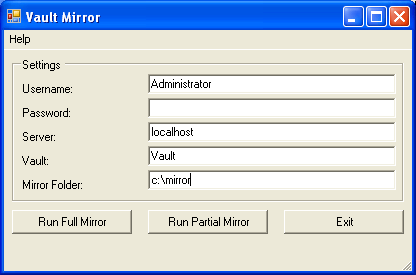
What is Vault Mirror?
It's a utility that downloads all the files from Vault for read-only purposes.  It was designed to be automated, lightweight and efficient.  It works with the base version of Vault, and it won't consume a license in the pay-for versions.

Vault Mirror does not create a perfect replica of a Vault.  It only downloads the latest version of the files.  Other things like items, properties, file history, security, lifecycle states etc. are not copied.

Where can I get it?
It's installed with the Vault Server, but you have to dig a bit in the SDK to find it.  The folder location is [ADMS dir]\SDK\VS8\CSharp\VaultMirror\bin\Release

Update:  In Vault 2011, the utility has been moved to a new location [ADMS dir]\SDK\util\VaultMirror

The readme (and source code) can be found two levels higher.  Feel free to copy things to a more convenient location.

Uses for Vault Mirror:
If you found a use not mentioned in the list below, please let us know by posting it in the comments section.

  • A basic version of replication.  You want to push files to a remote location or an outside group so that they can consume the files in read-only mode.
  • A basic form of backup.  If you use Vault for strictly document storage, this is a good way to make backups.  As an added bonus, you can quickly restore a single file that gets deleted. 
  • Copying files to a new Vault.  Use Vault Mirror to get the files, then use Autoloader to add them to the new Vault.
  • Sample code.  Since the Vault API has no event model, you need to use polling to detect changes.  The Vault Mirror source code has a great example of how this works.  It's the sample that I always refer people to.

Full Mirror command:
The full mirror command will basically synchronize your windows folders to match the Vault folder.  Be warned, this includes deleting local files/folders if it there is not a match in the Vault. 

The algorithm works by going through the Vault folder-by-folder and comparing the Vault files with the files on disk.  If a file exists in the Vault but not on disk, the file is downloaded.  If a file exists on disk but not in the Vault, the local file is deleted.  If a file exists on disk and in the Vault, the checksum is compared.  If the local file has a different checksum as the Vault file, the local file is overwritten.

In practice, this command is only used to clean up things.  It may take a long time to run depending on the size of the Vault, so this command should be run rarely if ever.

Partial Mirror command:
The partial mirror command will basically download all new files.  Any new file is downloaded.  No effort is made to clean up the local folder.

The algorithm works by doing a file search.  Vault Mirror remembers when the last, time a command was run, so it searches all file versions created after the time of the last search.  Any matching files are downloaded.

Since only new files are downloaded, this is a very scalable command.  It's no problem to run this command every few minutes so that your mirror folder is mostly up-to-date.

Similar features:
Since its release, Vault has added a lot of features that I thought would make Vault Mirror obsolete.  However the utility is still in use.  Maybe people don't know about the other features, maybe they like Vault Mirror better, or maybe there is some aspect of the built-in feature that makes it unusable.  Whatever the reason, I thought I should list the features that Vault Mirror "competes" against.  That way you can choose the utility or feature that works best for you.

  • Workspace Sync – With a single click you can update your workspace to match the files in Vault.  It can also be run from the command line, so it's possible to automate things just like with Vault Mirror.  But Workspace Sync comes with many more options.
  • Replication – This features creates many versions of a file store.  But unlike Vault Mirror, the replicated stores can be edited.  Vault users can run check-out, rename, copy design, and so on.  Basically any operation can be done.  To the user, it works just like a regular Vault.
  • DWF Publish – This feature existed since the early versions of Vault.  You can set a Vault to publish DWF files to a folder share.  Basically it's Vault Mirror, but just for DWF files. 
  • Hot Backup – This feature lets you back up the Vault with out having to take Vault offline.  With this type of backup, you get everything.  File history, meta-data, items, etc.

Comments

23 responses to “Vault Mirror”

  1. Max U Avatar
    Max U

    Doug, is there any way to reference iProperty while batch rename files in the Vault?

  2. Let me rephrase to make sure I understand: You want to write custom code that runs during the Rename Wizard in the Vault Explorer client, right?
    Sorry, it is not possible to customize existing commands.

  3. Hi,
    We can we find the exe of the vaultmirror?
    Beacause in Vault 2011 we only see the proj (source code),
    but no exe.
    Do we still have to build in VisualStudio?
    Can we download the exe ?
    Thanks

  4. Marcko Avatar
    Marcko

    “A basic form of backup. If you use Vault for strictly document storage, this is a good way to make backups. As an added bonus, you can quickly restore a single file that gets deleted.” – I plan to buy document storage Perth and I want to know if it’s a good thing to do? Thanks in Advance!

  5. I’m not familiar with Perth, so I can’t make any recommendations.

  6. Hi
    is there any possibility to copy our vault to a local folder, even if some filenames are too long? Maybe in commandline?

  7. It’s Windows that doesn’t allow you to have file paths that are too long. The workaround is to adjust your file tree (shorter names, less sub-folders).
    Another workaround is to change your folder mappings so that the path on disk is shorter when you download from Vault Explorer. This trick won’t work for Vault Mirror since it doesn’t use those folder mappings.

  8. Where I can find Vault Mirror for Vault 2012?

  9. Go to your client or server install. Find the SDK folder. Run the setup.exe. Complete the install and make not of the install folder. Go to the SDK install folder. Go to the util folder. There you will find Vault Mirror for Vault 2012.

  10. Tnahk you Doug.
    I did that but now I am getting an error message when try to run Vault Mirror.
    The dialog box is there just when the actual mirror is supposed to start I am getting an error message:
    Error loading IExplorerUtl.
    This is usually cased by the Vault Client not being installed or an DLL load error…
    Can you help.
    I have both Vault client and server 2012 installed on same 64 bit computer.
    Nina

  11. Hi Doug we installed Vault Mirror 2013 and get the follow error when we press any of the run buttons
    the request failed with http status 407 proxy access denied

  12. Doug, seems like a great utility! Thank you.. I will be testing it on Vault 2013.
    My plan is to keep a mirror of the vault files in a shared network drive that then replicates to dropbox..

  13. Sergio Avatar
    Sergio

    Does it support UNC names/shared locations (\ComputerName\SharedFolder...)?

  14. Sergio Avatar
    Sergio

    Nervermind! I tested one more time and it worked!

  15. I can´t seem to find “Doug’s CalcCRC32 function (from VaultMirror)” in the 2013 SDK version?
    http://forums.autodesk.com/t5/Vault-Customization/API-Doug-s-checksum-function-doesn-t-seem-to-work-for-me/m-p/3093818/highlight/true#M25
    Any link´s to the original C# version?

  16. Vault Mirror doesn’t use the checksum algorithm directly anymore. But here is a post with the original C# code.
    http://forums.autodesk.com/t5/Vault-General/Code-snippets-Vault-API/td-p/1714611
    It’s in the .zip file attached to the second posting.

  17. Hello Doug,
    Vault Mirror is a nice and useful tool.
    We worked with it in version 2011 with them an now with version 2014.
    You wrote here: “and it won’t consume a license in the pay-for versions.”
    This was right in version 2011.
    But now in Version 2014 it need a free license.
    If there is no free license, ist doesnt work an in the log-file you can se an error:
    System.Web.Services.Protocols.SoapException: 319
    bei VaultMirror.Command..ctor(MainForm mainForm, String username, String password, String server, String vault, Boolean useWorkingFolder, Boolean failOnError)
    bei VaultMirror.MainForm.Main()
    Is that an bug or desired?
    Best regards
    Michael

  18. Looking at the source code, yes Vault Mirror 2014 does consume a license when it runs. Offhand, I don’t know why this behavior was changed.

  19. Keith Doran Avatar
    Keith Doran

    Hello, I’m having trouble getting the Task Scheduler event to run and actually do anything, is there an example BAT file or script that has been configured that I can look at? I see the values in the read-me but I’m not getting mine to jive. the tool works when manually accessed, but not via a Task scheduler/command prompt.
    Thanks

  20. You can find some examples in postings on the Vault discussion group. For example: http://forums.autodesk.com/t5/vault-general-discussion/batch-file-for-vault-mirror/m-p/2530627

  21. Hallo Doug
    in the past we used this tool the export all de .dwf files to a folder.
    but after a move from one server to another (Vault 2013 basic) some files where missing.
    after some study we found that the files with the .dwg.dwf extension where copied but the files with the extension .DWG.dwf where not. so they seem to be case sensitive.
    is this a known issue? and is there an update / solution
    thanks

  22. I’m not aware of any case sensitive issues. Vault Mirror shouldn’t care about file type. My guess is that it’s something else.
    Is Vault Mirror writing to a log file. Is there anything in there about the files?
    Are there any security restrictions? Log into Vault Explorer using the same user that Vault Mirror uses. Can it access all the needed files?
    If you download the files through Vault Explorer, are there any issues?

  23. finally I got fantastic piece to read about some long path tool.

Leave a Reply