

Welcome to part 2 of my articles on custom objects. In part 1, I went over the UI features. Now I will go over the API features, which is where the real fun begins. If you want some sample code, have a look at my Discussion Thread app. But first… terminology.
Terminology
Custom Object and Custom Entity
These are the exact same things. Custom Object is the name we use in the UI. Custom Entity is the name we use in the API.
Entity Class and Custom Entity Definition
I’ve talked before about entities. As you probably guessed, custom entities are entities. What can be confusing is that all custom entities belong to the same Entity Class, which has “CUSTENT” as the ID value.
Custom Entity Definitions can be considered a sub-type of CUSTENT. So if I create custom entity definitions called “Foo” and “Bar”, they are both part of the CUSTENT entity class.
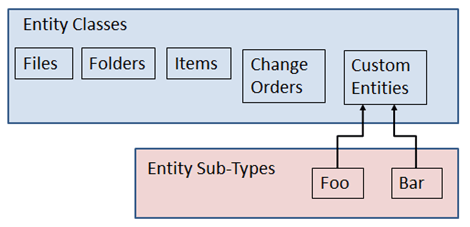
This distinction is important because a lot of things operate on the CUSTENT level. For example, FindCustomEntitiesBySearchConditions will search across custom entities of all sub-types. If you want to scope the search to a specific sub-type, you can do that with a search condition.
Permissions is another thing that operates on the CUSTENT level. If a user has the Custom Object Editor (Level 2) role, it applies to all custom entity sub-types. If you want each sub-type to have their own permissions, you can use the ACL settings.
API Features
Custom Commands
Your custom commands in Vault Explorer can be bound to specific custom entity sub types. That way the command is only visible when an object of your custom object sub-type is selected. Also, you can add commands to the context menu for your sub types.
To make use of this feature, create custom commands just like normal. The only difference is that you set the navigation type to a new SelectionTypeId which points to your sub-type.
Custom Tabs
You can define your own Vault Explorer tabs which only show up when your custom entity sub-type is selected. You also have the option of hiding the default tabs.
Just like with custom commands, you create a new SelectionTypeId to hook the tab to your sub-type.
New and Delete Override
You can take over the New and Delete commands in Vault Explorer so that your code gets called instead of the default. The IExtension interface has a new method, CustomEntityHandlers. Pass back a new CustomEntityHandler, which has New and Delete events that you can hook to.
Update Lifecycle State – Web Service Command Event
Through the CustomEntityService, you can hook to the GetRestrictions, Pre and Post events whenever a custom entity changes lifecycle state. These hooks apply to all CUSTENT state changes regardless of sub-type.
Update Lifecycle State – Lifecycle Event Job
Through the Lifecycle Event Editor you can configure the server to fire jobs when custom entities change lifecycle states. These jobs fire on sepecific state transitions regarless of entity type or sub-type.

Leave a Reply