


Warning: A new version of Vault has been released to Subscription Center. For the first time in many years, the Vault team put out a full release in between the standard yearly releases. R2 is not a service pack, which is why you need to be careful.
If you are installing for the first time, R2 is a good enough starting point. But if you are already running Vault in production, you will probably want to wait until Vault 2016. Upgrading to R2 is only for those who need the new features right now.
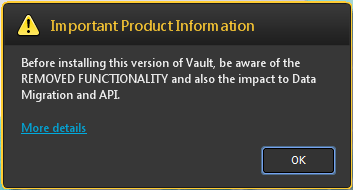 You thought I was joking about the warning? This is actual UI from the installer.
As usual, I’ll stick to the API-related stuff and leave it to other blogs to go over the end-user feature set. There is a pretty good overview over at Design and Motion.
Vault 2015 R2 technical details:
Just like with any other full release, 2015 R2 has it’s own SDK with its own DLLs and web services.
- Version number: 20.x.x.x
The 2015 release has 19 as the version number. - Web service URL path: /AutodeskDM/Services/v19.1/
Technically it should be v20 in the path. The important part is that it’s different than v19, which is the path to the 2015 web services. - Web service compatibility: A 2015 R2 server is compatible with the following clients:
- 2015 R2
- 2015*
- 2014*
- 2013*
* = No compatibility for Item and Package services. Those services are completely disabled.
- Package Service disabled for R2. Almost every function will return an error.
- Plug-in compatibility: As usual, plug-ins need to be re-compiled for each version.
- ApiVersion attribute needs to be set to “8.0”
- The .vcet.config files need to reference version “20.0.0.0” of any Vault SDK DLLs.
- Plug-ins should go in the folder “%ProgramData%\Autodesk\Vault 2015 R2\Extensions”
- When developing for the Autodesk Exchange app store, “V2015R2” is the value to use for the SeriesMin and SeriesMax values in the package.xml.
- Vault Office Client and the full Vault Explorer Client are binary equivalents. Any plug-in you write will load in both clients. There is no way for your code to detect which client it’s running in.
- R2 uses .NET 4.5 and Visual Studio 2012 is still the recommended IDE. No change from 2015.


Leave a Reply