
Update:  The 2013 version is available.

Here is the new version of Project Thunderdome.  It's mostly the same app as before, but now updated to work with Vault 2012.

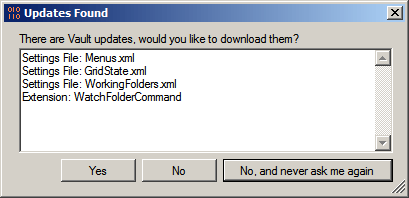
It still pulls down updates.
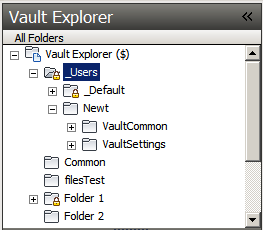
It still has the "Users Folder" concept.
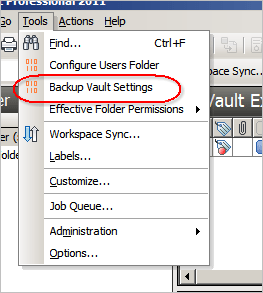
And you can still backup your settings.
There are some minor fixes.  For example, if an extension gets installed, a menu reset is performed. 

If you have a Web Service event handler, Project Thunderdome can pull that down too.  Vault 2012 has the concept of an Extension, which encompasses both custom commands and web service command event handlers.  Thunderdome will pull down an extension, regardless of type.


Requirements:
Vault Workgroup/Collaboration/Professional 2012

Click here to download application
Click here to download source

UPDATE:  The tool has been updated to fix an issue where settings files were being set as read-only.  The links above are to version, 2.0.2.0, which has the fix.


Upgrading from Vault 2011

The settings are different from Vault 2011 and Vault 2012.  So if you are pushing out settings and extensions, make sure they are synced to Vault 2012.

Likewise if you have saved settings, you will might want to clear those out and re-save with your Vault 2012 settings.

As with all the samples on this site, the legal disclaimer applies.


Comments

9 responses to “Thunderdome 2”

  1. Scott Moyse Avatar
    Scott Moyse

    Doug,
    I’m trying to set this up, but i get the following message when I try to backup my settings. http://screencast.com/t/ef6BICOMrjy
    Also if i backup my settings, as Administrator, and then try to copy those settings to the Default folder, then this will create duplicate file names in Vault. How do you get around this?
    Cheers
    Scott

  2. Error 1058 is UniqueFileNameRequiredViolated, which means you have the “Enforce Unique File Names” setting turned on and you tried to add a file with the same name as another file in the Vault.
    Basically, the backup feature in Thunderdome is not compatible with the Unique File Name feature. The reason is that everyone’s backup files will have the same name.
    The only options are either turn off the Unique File Name feature or don’t use the backup command in Thunderdome.

  3. Scott Moyse Avatar
    Scott Moyse

    Ok but doesn’t that mean I can’t push the config settings to the users at all? Simply because the same filename would exist in each user folder….

  4. You can still push settings as long as each file has a unique name. The push goes directly from the default folder to the user’s local folder. The user does not need their own Vault folder in order for the push to work.

  5. Scott Moyse Avatar
    Scott Moyse

    my confusion is this: the ViewStyles.xml file would have the same file name for every user, therefore duplicating the file throughout the user folders from one user to the next.

  6. ViewStyles.xml would live in Vault under Thunderdome’s “default” folder. That would be the only place that file exists in Vault. When Thunderdome pushes the file to users, ViewStyles gets downloaded directly to the client computer (for example, somewhere under C:\Users\myusername\AppData\Roaming).
    So each user will have a copy of ViewStyles on their own computer, but this is fine since there is only one copy in Vault.

  7. Scott Moyse Avatar
    Scott Moyse

    Ok great, cheers for clarifying.
    I have noticed the add-in has created a folder for each user that is enabled in Vault. Are these folders created upon install of the add-in? I just can’t remember if its as a result of trying to run the backup or not.
    Also when you select don’t ask me again (re, syncing the profile data) how do you get it to ask again or sync again at a later date? Do you have to reinstall the add-in?
    cheers for you help doug
    Scott

  8. If you go to the location of the vault extension (%programData%\Autodesk\Vault 2012\Extensions\ProjectThunderdome) there should be a readme file explaining how to get that dialog back.
    The quick answer is to delete the “settings.xml” file from the ProjectThunderdome folder.

  9. Scott Moyse Avatar
    Scott Moyse

    cheers doug. I was wondering if there was a Readme, I should have thought about looking there before hand.

Leave a Reply to Doug RedmondCancel reply

Discover more from Autodesk Developer Blog

Subscribe now to keep reading and get access to the full archive.

Continue reading