


Here is the first major update to The TTP Project. The initial release was focused on proving out a prototype SDK for the PLM 360 API. This time around I focused on making the app itself more useful. There are some nice new features here, including things you can’t do through the web UI.
Custom UI

(click for full size image)
You can now build your own UI for item detail fields. This is done using XAML files to define the UI. Next, you link those files to the workspaces and operations you want to apply them too. If you are familiar with Vault Data Standard or DECO, then you get the idea. In fact, most of the code is copied from DECO.
Custom UI is specific to a workspace. You can also define different UI for each operation (view, new and edit). The Layout Settings window that allows you to configure which UI is used in which cases. If no UI is defined, then the default view is used.
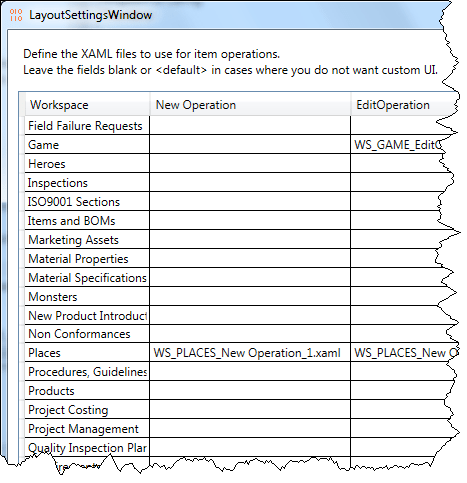
(And yes, I notice that I forgot to change the dialog title)
Multi-select and multi-edit
You can now select multiple items in a workspace. The view panel will show all the fields that have the same value across all the selections. If a field is different, it shows a blank value.
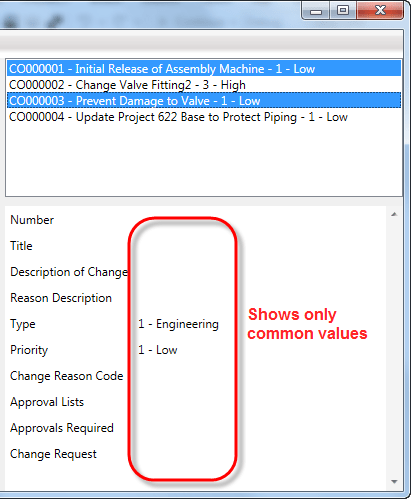
If you run the edit command during a multi-select, any field you set will be applied to all the selected items. All other field values are left alone. So it’s a nice easy way to set a value across multiple items.
Other goodies
- Support for picklists.
- Auto-renewal for expired security credentials. If you liked my earlier OAuth article, you can grab the TTP source code for examples.
- Quicker navigation of items. Caching has been implemented in the code so viewing an item for the second time doesn’t involve a web call.
Requirements:
- PLM 360
- Windows OS
- .NET 4.5
- For creating custom UI: A XAML editor such as Visual Studio or Expression Blend
Click here to download the application
Click here to download the source code
As with all the samples on this site, the legal disclaimer applies.
Leave a Reply