

The question has come up a couple of times on how to associate Property Definitions with a Category. So I thought I would write up the code and post it here.

The code is a bit hard to follow unless you understand a few things about Categories. A Category is a behavior that is a container for other behaviors. Things like property definitions, lifecycles and revision schemes can be thought of as living inside a category or set of categories. So in the case of properties, we are adding a new property definition to a Category’s collection of behaviors. So a lot of the code deals with Behavior objects, which is an abstract representation of our property definition. The good news is that the code below can easily be re-purposed to associate revisions and lifecycles to a Category.
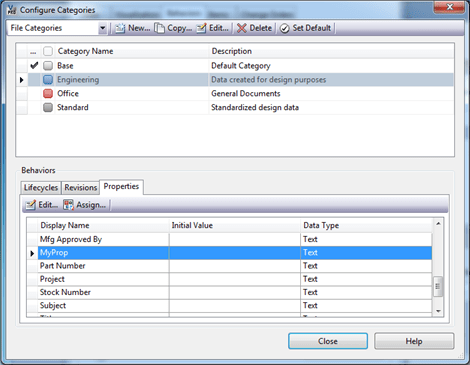
In this example code, I’m going to take a UDP I created, MyProp, and associate it to the Engineering category.
|
// C# private void UpdateCategoryProperties(WebServiceManager mgr) { Cat [] categories = mgr.CategoryService.GetCategoriesByEntityClassId("FILE", true); Cat engineeringCat = categories.SingleOrDefault( n => n.SysName == "Engineering");
CatCfg catCfg = mgr.CategoryService.GetCategoryConfigurationById( engineeringCat.Id, new string[] { "UserDefinedProperty" });
IEnumerable<long> propDefIds = catCfg.BhvCfgArray[0].BhvArray.Select( n => n.Id);
PropDef[] props = mgr.PropertyService.GetPropertyDefinitionsByEntityClassId("FILE"); PropDef myProp = props.SingleOrDefault(n => n.DispName == "MyProp"); if (propDefIds.Contains(myProp.Id)) return; // the property is already hooked to the category
long [] propDefArray = propDefIds.Concat( new long [] {myProp.Id}).ToArray(); BehaviorAssignmentType [] typeArray = propDefArray.Select( n => BehaviorAssignmentType.Default).ToArray();
mgr.CategoryService.UpdateCategoryBehaviorAssignmentTypes( engineeringCat.Id,"UserDefinedProperty", AllowNoBehavior.Yes, propDefArray, typeArray, true); }
|
|
' VB.NET Private Sub UpdateCategoryProperties(mgr As WebServiceManager) Dim categories As Cat() = _ mgr.CategoryService.GetCategoriesByEntityClassId("FILE", True) Dim engineeringCat As Cat = categories.SingleOrDefault( _ Function(n) n.SysName = "Engineering")
Dim catCfg As CatCfg = _ mgr.CategoryService.GetCategoryConfigurationById( _ engineeringCat.Id, New String() {"UserDefinedProperty"})
Dim propDefIds As IEnumerable(Of Long) = _ catCfg.BhvCfgArray(0).BhvArray.[Select](Function(n) n.Id)
Dim props As PropDef() = _ mgr.PropertyService.GetPropertyDefinitionsByEntityClassId("FILE") Dim myProp As PropDef = props.SingleOrDefault( _ Function(n) n.DispName = "MyProp") If propDefIds.Contains(myProp.Id) Then Return ' the property is already hooked to the category End If
Dim propDefArray As Long() = _ propDefIds.Concat(New Long() {myProp.Id}).ToArray() Dim typeArray As BehaviorAssignmentType() = _ propDefArray.[Select]( _ Function(n) BehaviorAssignmentType.[Default]).ToArray()
mgr.CategoryService.UpdateCategoryBehaviorAssignmentTypes( _ engineeringCat.Id, "UserDefinedProperty", _ AllowNoBehavior.Yes, propDefArray, typeArray, True) End Sub
|
After I ran the code, my Engineering category looked like this.


Leave a Reply to Doug RedmondCancel reply