
Security

Vault uses two different security mechanisms.  There is a system based on user permissions and a system based on access control lists (ACL).  The permissions-based security is part of the base Vault functionality, but the ACL based security is an optional feature which may or may not be available depending on the version of Vault.

Both security systems operate differently.  They are conceptually different, they have different API's, and they were designed to solve different problems.  There are even cases where the two mechanisms contradict each other.

Permission-Based Security

Each user has a set of roles, and each role has a set of permissions.  These permissions determine what the user can do.  Also, these permissions apply globally to everything in the Vault.  For example, if a user has the “File Read” permission, then it can read any file in the Vault.
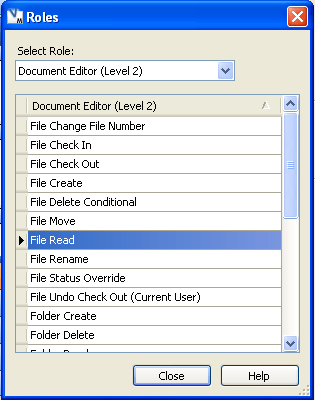
If a user has multiple roles, then its permission set is the union of those role permissions.  So a user has the “File Read” permission as long as it is in at least 1 role that has that permission.  The same thing applies to groups.  Groups can have roles associated with them.  These roles trickle down to the users.  For example, a user can have no permissions of it's own, but if it's part of the Administrators group, that user has administrative permissions.  Being part of a group will never take away permissions from a user;  the user can only gain extra permissions when being part of a group.  In other words, an inclusive model is used.

ACL-Based Security

An ACL is a list of who can is allowed and denied access to a given object.  Each ACL contains a list of Access Control Entries (ACE).  Each ACE contains a single User or Group and the list of permissions that it has.  Vault currently has 3 types of permissions:  Read, Write and Delete.  An ACE does not need to contain all 3 permissions.  For example, it can just set Read to ALLOW (true) and not specify the Write or Delete permissions.  
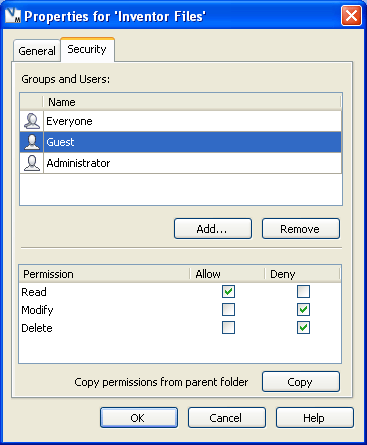
 

ACLs use an exclusive model.  If a user has access but is in a group with restricted access, then the user will also have restricted access.  This is directly opposite from the permissions-based system.

Here is the algorithm for determining if an ACL allows user access:

A user is given access if and only if their user or parent group has an ALLOW bit and no DENY bits.

The ACL model adds restrictions above and beyond the User Permission model.  However, the ACL model does not replace the other model.  In order to read a file, the user still needs the File Read user permission in addition to an ALLOW read ACL permission. 

Flowchart

Let’s put everything together in flowchart form:
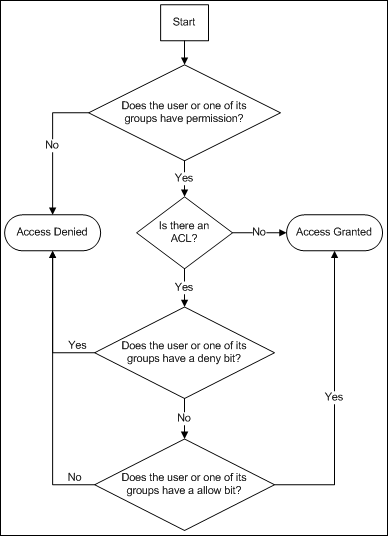
Keep in mind this process gets run for each permission.  So it’s possible for READ to evaluate to “Access Allowed” while WRITE evaluates to “Access Denied”.


Comments

12 responses to “Security”

  1. Hi,
    I’m am new with autodesk vault 2007 and im interested in learning about updateACL method and AccessPermis object some of the api method which can be use to create roles. I would really appreaciate it if you could post an example of how to use Admin service and security service. I would like to use the read, delete and add capability of ACL
    Thanks

  2. Vault 2007? I don’t think we ever gave a release that name. The release before Vault 2008 was called Vault 5. Is that the release you are talking about?
    The Effective Folder Permissions sample on this blog is a good example of how to read ACL data. I don’t have a write sample, but it’s pretty much the opposite of read.
    UpdateACL in the Security service is how you add, update or delete the ACL on a folder.

  3. yes its autodesk vault 2008. by the way thanks for the reply. i just discovered how to use updateACL
    heres the code i use.
    secSvc.UpdateACL(subfolderids[0], aces.ToArray());

  4. The only problem I encounter is that updateACL overwrite the current role it does not insert the role I created as a new role. Do you have an idea of what method i should use instead of updateACL

  5. So the problem is that you have existing entries in the ACL that disappear when you call UpdateACL, correct?
    This is the intended behavior. If you want the existing entries to stay, you need to pass them in as part of the UpdateACL call.

  6. its ok already i did a workaround. its working perfectly now. thanks :)

  7. hi,
    i also tried to modify the security, but on a file.
    the file inherits from the folder and i want to overwrite the files security.
    but if i look in my file properties after i tried my function there is no change.
    i use addsystemacl and setsystemacl.
    i hope this is correct, but i cant find any example how to use the functions…

  8. Hi Doug!
    I got some questions to you about Permission-Based Security:
    1. Where can I read more about permissions.
    2. Where can I get entire list of all Vault permissions (Permis class) with Permis.Descr and Permis.Id members and short names, that are used in SDK (AdminUserRead, VaultOptionsSet, ChangeOrderRoutingCreate, etc.) to describe methods’ Required Permissions.
    3. What’s the better way to call AdminUserRead-required methods (like GetGroupInfoByGroupId) for non-admin users? Redirect this task to JobProcessor?
    Regards, Dmitry!

  9. Hi Doug!
    I got some questions to you about Permission-Based Security:
    1. Where can I read more about permissions.
    2. Where can I get entire list of all Vault permissions (Permis class) with Permis.Descr and Permis.Id members and short names, that are used in SDK (AdminUserRead, VaultOptionsSet, ChangeOrderRoutingCreate, etc.) to describe methods’ Required Permissions.
    3. What’s the better way to call AdminUserRead-required methods (like GetGroupInfoByGroupId) for non-admin users? Redirect this task to JobProcessor?
    Regards, Dmitry!

  10. You might be able to find more on the online help for Vault: http://help.autodesk.com/view/VAULT/2015/ENU/
    GetAllRoles and GetPermissionsByRoleId will let you construct the full list of permissions. Both functions are in the AdminService.
    Job processor is one way for a non-admin to run an admin operation. But there are a lot of limitations (time delay, hard to push data to a client).
    Other options include:

    – Client app impersonates an admin by creating a second login.
    – Create a new web service that exposes admin data.

  11. Jamie Johnson Avatar
    Jamie Johnson

    what is better, to reuse an ACL (by ID) per each item object or copy the ACL per each item object?

  12. The recommended approach is to use lifecycle states or Folders to manage security. Setting ACLs on each object can be difficult.
    If you think you need to do security on an object-by-object basis then it depends on what you want. If you everything to have the same security and you want to be able to update them all together, then sharing an ID is a good idea. If not then, you are forced to have a different ACL ID for each object.

Leave a Reply

Discover more from Autodesk Developer Blog

Subscribe now to keep reading and get access to the full archive.

Continue reading