Security – Folder ACLs and System ACLs

If you haven't read my earlier article on security, you might want to do that first.  This article is going to dig deeper into Vault's the security framework.  That's right, there's even more.  The good news is that the hard stuff is over.  Now that you know what an ACL is an how it's used to calculate the read, write and delete permissions, we can talk about how ACLs are hooked to files.

Folder ACLs

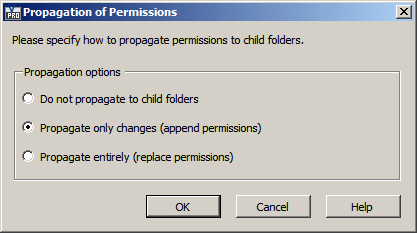
A folder can have an ACL on it.  That ACL will not only apply to the folder itself, but it also applies to any files in that folder.  If a sub-folder is created, it will inherit the ACL from the parent folder, but this can be changed later on.  When you change the ACL on a folder it immediately applies to the files in that folder.  There are also some options for propagating the changes to sub-folders.


System ACLs

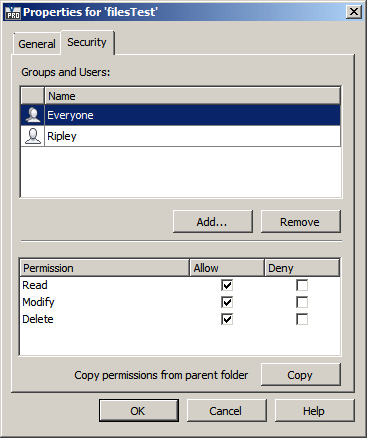
A file can have 2 ACLs on it.  One comes from its parent Folder and the other one is something called a System ACL.  If present, the System ACL overrides the Folder's ACL.  The 2 ACLs are not merged in any way.  The System ACL completely wins out.  So you may find cases where the folder says that the user has read only access, but they can edit certain files in the folder.

There are various ways to set the System ACL:

  • If the Vault is not set up to use Item security, then the file's lifecycle state dictates the System ACL.
  • If the Vault is set up to use Item security, then the item's security settings dictate the System ACL.  This is only for cases where the file is linked to an Item and the Item is in the Released state.
  • The file's System ACL can be set explicitly in the Properties dialog under the file menu (not to be confused with the Properties grid).  Setting the System ACL in this manner will overwrite any file or item lifecycle security settings.  At the API level, you use SecurityService.SetSystemACLs().

Regardless of how the System ACL is set, you can read it using SecurityService.GetEntACLsByEntityIds().  Even nicer is that the function returns both the regular ACL (the one from the folder security) and System ACL.


Comments

9 responses to “Security – Folder ACLs and System ACLs”

  1. Hi, i would like to edit the file security with .net.
    i currently inherit the security from the folder, but with the functions addsystemacl and setsystemacl i cannot overwrite the files security settings.
    Manually i would set the checkbox in the file properties “overwrite security” and modify them.
    How could i get that with .net ?
    thanks

  2. Protecting Your Home With Video

    If theres one thing that thieves and trespassers fear, its house monitoring cams the ultimate in protection techniques. Sometimes, even if the house is not outfitted with a DVR camera method, just the plain sight of place under monitoring sympto…

  3. Protecting Your Home With Video

    If theres one thing that thieves and trespassers fear, its house monitoring cams the ultimate in protection techniques. Sometimes, even if the house is not outfitted with a DVR camera method, just the plain sight of place under monitoring sympto…

  4. Protecting Your Home With Video

    If theres one thing that thieves and trespassers fear, its house monitoring cams the ultimate in protection techniques. Sometimes, even if the house is not outfitted with a DVR camera method, just the plain sight of place under monitoring sympto…

  5. Protecting Your Home With Video

    If theres one thing that thieves and trespassers fear, its house monitoring cams the ultimate in protection techniques. Sometimes, even if the house is not outfitted with a DVR camera method, just the plain sight of place under monitoring sympto…

  6. Bryan Rawling Avatar
    Bryan Rawling

    Doug
    your statement
    “Regardless of how the System ACL is set, you can read it using SecurityService.GetEntACLsByEntityIds(). Even nicer is that the function returns both the regular ACL (the one from the folder security) and System ACL.”
    Does this mean the reported folder security can then be applied to the file using SecurityService.SetSystemACLs().
    therefore reseting the file security so that it does not use the system ACL applied from the lifecycle state change.
    Basically I am looking to trigger a reset of the File security as the folder security is required and should not be bypassed by the file state security. Maybe we need to simply clear the file System ACL applied by the lifecycle state so that it then uses its folder ACL.
    I am hoping that you might be able to confirm that it is possible to use the API to control this on a state change?
    We Need to apply and retain the folder security throughout our Vault!
    It would be impossible to manage multiple catagories , lifecycles and states for each project , we already have 25+ projects with potential for many more, each project is a individual client who’s data security needs to be maintained at all times therefore we need the folder security to only allow specific user groups access to specific projects.
    Any help with this would be great, Can it be done?
    Example of the code would be very much appretiated
    Regards Bry

  7. Clearing the system ACL will cause the file to revert to folder security.
    If you don’t ever want to use lifecycle security, you can just clear the security details on the lifecycle state settings. That way you don’t have to come up with an API solution.
    Yes, you can update the ACL data through the API. And you can trigger the code on a state change. However permissions becomes a problem. Only administrators can directly set ACL data. So you would have to work around that problem.

  8. Iwan van Wijk Avatar
    Iwan van Wijk

    Doug,
    Is there a way to check the permissions of the current folder without using the standard method? everytime we wont to read the information in readonly mode we get a error 303.
    sample code : Vault.Library.ConnectionManager.LogIn(servername, vaultname, “user”, “Password”, Vault.Currency.Connections.AuthenticationFlags.Readonly, null.
    Reason for this question is that the standard methode requires a Vault License and we want to use this for all Vault users.
    Regards Iwan

  9. There are a few strange cases where you can’t read data in Readonly mode. ACL data is probably one of those cases.
    Security is considered an administator function, so not much thought was put into read-only workflows.
    For a workaround, your app can do a Standard login, read the security and log out quickly.

Leave a Reply

Discover more from Autodesk Developer Blog

Subscribe now to keep reading and get access to the full archive.

Continue reading