

Introduction:
6 Months ago I posted a utility called The Recycle Bin. So by now, it's being used by millions of people worldwide, right?
Maybe not. The real number is probably somewhere around 0 or less. But that's not going to stop me from writing a companion utility. I'm kind of dumb that way.
Overview:
Restore Recycled will restore a file that was removed via The Recycle Bin. If you recall, when you empty The Recycle Bin the file isn't actually deleted, instead it's moved to a backup Vault. Restore Recycled allows you to bring the file back to the original Vault.

Search the backup vault for the file you want to restore.
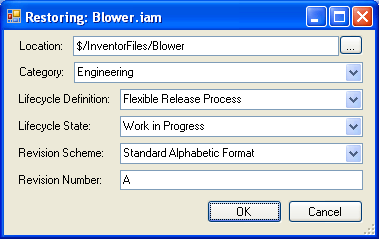
Restore the file and configure the appropriate settings.
Requirements:
Vault Workgroup/Collaboration/Manufacturing 2010
The Recycle Bin
Click here to get the application
Click here to get the source code
How to use:
- Run Restore Recycled.
- Provide the necessary login information. The "backup database" is the Vault where we are restoring files from. The "target database" is the Vault where we are restoring files to.
- Type in the file name of the file you want to restore. Wildcard characters are supported.
- Browse the list of files to find the correct file and version you want to restore. If the file was backed up with Recycle Bin 1.1, the version name will be encoded in the file name (ex. Blower.3.iam is really the 3rd version of Blower.iam).
- Click the Restore button.
- In the restore dialog, set the relevant information, such as the folder location and category. If meta-data is available, the utility will pre-populate this information, but it can still be edited if needed.
- Click OK and wait for the operation to complete.
Important notes:
- Restore Recycled doesn't fix up file dependencies or BOM data. If you are restoring a CAD file, I recommend checking out and checking back in through the CAD application. This should repair the file linkages and metadata.
- When a file is restored, it is not deleted from the backup database.
- Based on how the Vault is set up, it may not be possible to restore the file in the exact way intended.
- For example, the lifecycle state might not get set properly because there is no allowed transition from the default state to the intended state.
- In other cases, automatic operations, such as increasing the revision when the file moves to Released, might cause the restored file to have incorrect data.


Leave a Reply