Q-Tools and Watch Folder 2013

For this post, I bring you two whole apps.  I’ve updated Q-Tools and Watch Folder for Vault 2013.  Technically the 2012 versions can still work with Vault 2013 server, but there were a few optimizations I wanted to do using the new API features.


Q-Tools 2013

For Q-Tools, the feature set is the same as before, but I make use of the new Job.IsOnSite parameter to determine if a job needs to be rerouted or not.

Here is the full feature list:

  • Logging – Issues are logged to a text file.
  • Stale Job Detection – Jobs on the queue too long can be considered an issue.
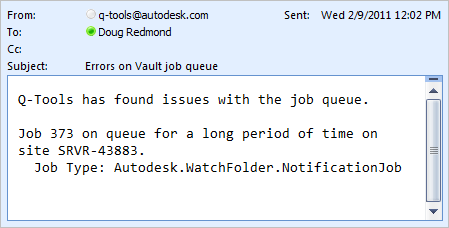
  • Email Reports – Issues can be emailed to one or more recipients.
  • Queue Cleanup – Jobs with issues can be automatically removed from the queue.
  • Queue Forwarding – In multi-site and multi-workgroup environments, jobs can get routed to a single site.
Requirements:
– Vault Workgroup/Collaboration/Professional 2013
– Job Server feature enabled
Click here to download the application
Click here to download the source code

Click here for Q-Tools 2012

To setup:

  • Designate a computer on the network that the Q-Tools service should run on.  Only 1 Q-Tools can be running for a given Vault deployment.
  • Run the installer.
  • Go to the installation folder and update the settings.xml.  The XML comments will explain this step.
  • Run the Q-Tools service.

Migrating from Q-Tools 2012:

  • Actually I don't recommend migrating.  The 2012 Q-Tools version should work fine with the Vault 2013 server. 
  • If you still want to migrate, it should be fairly easy.  The Settings.xml has not changed.  I recommend making a copy of the XML file, uninstall Q-Tools 2012, then install Q-Tools 2013.

As with all the samples on this site, the legal disclaimer applies.


Watch Folder 2013

Although the feature set is the same, the setup is much easier.  No longer do you have to configure Windows tasks to add notification jobs to the queue.  Using the new features on IJobHander, the jobs are added from JobProcessor plug in.  Right before JobProcessor goes idle, Watch Folder puts a new notification job on the queue.  That way new files are checked every time JobProcessor cycles.

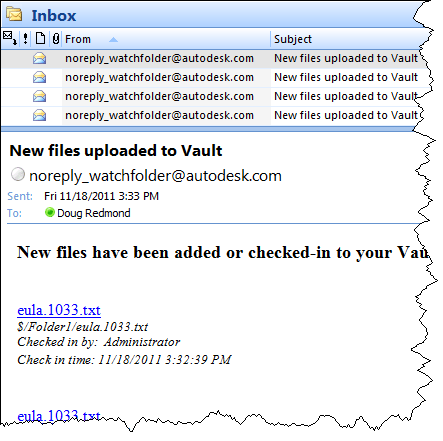
In case you aren't familiar with it, Watch Folder is an app that allows you to "watch" a set of Vault folders so that you receive email notifications when files get added or updated in those folders.
Requirements:

  • Vault Workgroup/Collaboration/Professional 2013
  • Job Server enabled
  • An SMTP server somewhere on the network

NOTE:  This isn't something you can just download and run.  The Vault administrator needs to set up some server components before this feature can be used.

Click here to download the application
Click here to download the source code

Click here for Watch Folder 2012

To use

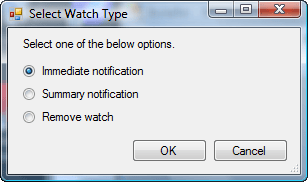
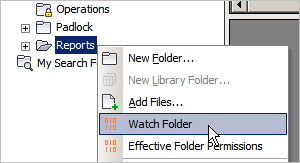
For Vault users, download the application and run the installer.  Just make sure that the administrator has set up the Vault environment first.  Next, start up Vault Explorer and right-click on a folder that you want to watch.  Select the Watch Folder command and decide how frequently you want notifications.
For Vault administrators, download the application and run the installer.  Next follow the instructions in the readme file in the install folder (%ProgramData%\Autodesk\Vault 2013\Extensions\WatchFolder).

Notes:

  • A watch on a folder will automatically apply to any sub-folders.
  • Removing a watch will also remove watches on sub-folders.
  • You can't have an immediate watch and a summary watch on the same folder.  Setting a folder to one type overwrites the existing setting.
  • You need to be at least Document Editor (level 1) in order to set up a watch on a folder.
  • You need to have a valid email address in your Vault user settings.
  • The contents of the email can be customized by the Vault administrator.  See readme file.

Migrating from Watch Folder 2012:

  • WatchSettings.xml now needs a Vault username and password.  Everything else is the same, so you can just add <Vault_Username> and <Vault_Password> tags to your existing config file.  The Vault user must be able to add and delete jobs from the queue.
  • All the other settings files from R1 can still be used, just copy over WatchCollection.xml and WatchEmailBody over to the install folder.

As with all the samples on this site, the legal disclaimer applies.


Comments

26 responses to “Q-Tools and Watch Folder 2013”

  1. Doug, could you give any advice for those whos Q-tools service never starts automatically even so has “Automatic” Start type. Starting manually works fine.

  2. Try the “Automatic (delayed start)” option.

  3. Wow!! Works just like sharm. Thanks!

  4. jparks_79 Avatar
    jparks_79

    Hi Doug, Sorry to bother so close to AU. But is it possible to specify that an email be sent to the user who submitted the job, rather than a static list? Through the settings.xml file?

  5. No QTools doesn’t do that, but it’s a great idea. Maybe I’ll get that in to the 2014 release.

  6. Some time ago qtool stopped doing what it is supposed to.

    Logs are full of statements:

    Exception thrown
    System.Net.WebException: Unable to connect to the remote server —> System.Net.Sockets.SocketException: A connection attempt failed because the connected party did not properly respond after a period of time, or established connection failed because connected host has failed to respond XXX.XX.X.XXX:80
    at System.Net.Sockets.Socket.DoConnect(EndPoint endPointSnapshot, SocketAddress socketAddress)
    at System.Net.ServicePoint.ConnectSocketInternal(Boolean connectFailure, Socket s4, Socket s6, Socket& socket, IPAddress& address, ConnectSocketState state, IAsyncResult asyncResult, Int32 timeout, Exception& exception)
    — End of inner exception stack trace —
    at Autodesk.Connectivity.WebServices.SecuritySvc._SecurityService.Invoke(String methodName, Object[] parameters)
    at Autodesk.Connectivity.WebServicesTools.UserPasswordCredentials.SignIn(SecurityService secSvc, WinAuthService winAuthSvc)
    at Autodesk.Connectivity.WebServicesTools.WebServiceManager.SignIn()

    at Q_Tools.QToolsService.CheckAndReroute(List`1 issues, Site site)

    What might be the reason of the problems?
    PS: Vault Explorer does can connect to all replicated sites.

  7. Doug, could you consider adding some extra setting to Q-tools?
    “Error message” should be taken to account in . Typically I prefer to delete issued jobs manually but I’d like jobs with particular errors be deleted automatically.
    For example “Unable to retrieve File version for id” doesn’t require humans attention.
    I can predict some challenge for my wish to be done – error message returned by Job Processor could be localized, but i belive you know how to proceed.
    Thanks (Jast in case).

  8. this is not actual issue anymore

  9. Hi Doug,
    Let me ask you one more question about two issues I faced while testing the WatchFolders. http://youtu.be/98j_JC_2rIw
    I am looking forward to hearing from you.

  10. There is something wrong with your setup. If things are working well, you should almost always see a Autodesk.WatchFolder.NotificationJob on the queue. It’s like a perpetual job that insures that notifications go out every time the job processor cycles. There should be an error log for Job Processor. That might give you some hints on what’s wrong.

  11. Watch Folder Readme references some “QueueJob utility”.
    I remember to see it somwhere but can’t find it nowadays.
    Where should I search for the utility?

  12. QueueJob is no longer needed in the 2013 version. I thought I removed all references in the readme, but I must have missed some.
    In 2012 QueueJob was a separate exe needed to add the Notification jobs to the queue. In 2013, the Job Processor plug-in is able to add the jobs directly.

  13. Is it ok that «Setting a watch folder for user» job is in the queue even when no users have set any notification?

  14. The longer I use Q-tools the more I think I should allow deleting error jobs of DWF.Create type.
    The only inconvenience stops me now – I would have no choice but to check for log each time (now i alwost never use its log).
    As we use the unique filename approach I’d rather prefer to get by mail not Id of the job but filename that had an error (at least as extra info). AFAIK Q-tools now have no option to customize e-mail, right?

  15. BTW, Why column is not available in Job Queue Table?
    Could Administrator determine where the job came from? I know the info would be in q-tool log (in case it will get there)? Or it’s impossible without using API?

  16. No, I don’t think you can customize the emails for Q-Tools.
    What column are you looking for in the Job Queue window? At the API level there is a Boolean that tells if the Job lives on the site that you are logged in to. But there is no value that contains the name of the site.

  17. Doug, our Vault configuration is Connected Workgroups. Q-tools works fine for all jobs within that workgroup which it belongs to but as soon as I try add to its config new site section (< are replaced with #):
    #Site>
    #Name>CS-Dvault#/Name>
    #Hostname>Full-name-of-the-workgroup2-ADMS#/Hostname>
    #IsSSL>false#/IsSSL>
    #Port>80#/Port>
    #IsCentralQueue>false#/IsCentralQueue>
    #/Site>
    Q-tool service refuse to start (error 1053).
    Coould you advice how to debug this?
    Thanks in advance.

  18. I’ll have to see the full config file (feel free to blank out password values). Just send it to me in an email. You have my email address, right?

  19. To my mind WatchCollection.xml needs some more inteligence.
    Now it doesn’t contain ADMS-names (only Vault names) thus Job Processor connected to one ADMS does generate useless requests to the vault of another ADMS (if it was connected to it previously).

  20. I don’t see any problems with the config file. Error 1053 is not coming from Vault. It’s a Windows Service error code meaning that the service did not start in time.
    Are there connection problems with one of the servers? Or is there a typo in one of the server names?
    QTools should be writing out a log file, which may give more details about the problem.

  21. Doug, are there any chances that “Special string” for “Comment” would be added to Watch Folder?

  22. Unfortunately I don’t know how to determine server connection problems (the name of server in that new section is pinging OK).
    We do have occasional performance issues but i don’t know why.
    I don’t see any hints in Qtool log.
    One more thing about jobs seems strange to me – jobs from that particular server have 11 digitts in their ID while jobs from all the rest servers have 6-digits IDs. Is it something that could be tuned by Vault admin?

  23. Hi, Doug
    Are you planning to migrate the 2013 version of Watch folder to 2014?. For me and my customer would be excellent!
    Thanks!

  24. Sorry, this is not on my list of apps to update.
    However Autodesk Consulting has a product called “Enterprise Add-On for Vault” (VAO for short) which does email notifications.
    http://underthehood-autodesk.typepad.com/blog/2012/03/enterprise-add-on-for-autodesk-vault.html

  25. Doug, do you have any plan to migrate Watch Folder to 2014?

  26. Probably not.

Leave a Reply

Discover more from Autodesk Developer Blog

Subscribe now to keep reading and get access to the full archive.

Continue reading