

Before you read this, I suggest reading my post on entities then reading part 1 on properties. If not, I'm not legally responsible for any brain damage that may occur.
File Properties
In my last article, I mentioned how the properties concept spans multiple entity classes. However there are still implementation details that are unique to each class. In this article, I will focus specifically on file properties.
Content Source Properties
In the context of Files, a content source property represents a property within the file. This might be a title block attribute from an AutoCAD file, or an iProperty from an Inventor file, or a structured storage property from a Microsoft Office file. A property may even be something more abstract, such as the number of colors in a JPG file. The point is that the property lives inside the file, and Vault needs a way to read and write this information.
As I mentioned in my last article, the content source provider is the glue that reads and writes content source properties from a file and maps them to Vault UDPs. Because each file type is different, there are multiple providers, broken up by file type.
The "All Files" provider is a special case. It's the one that gets used when no other provider is available. This provider works by using the Windows iFilter mechanism to read the content source properties. If no suitable iFilter is found, then content source properties cannot be read for that file type. The "All Files" provider cannot be used to write content source properties.
Mappings
Content Source Properties are useless to Vault unless they are mapped to a UDP. If you've seen the Properties dialog, you have probably noticed a bunch of complex options.
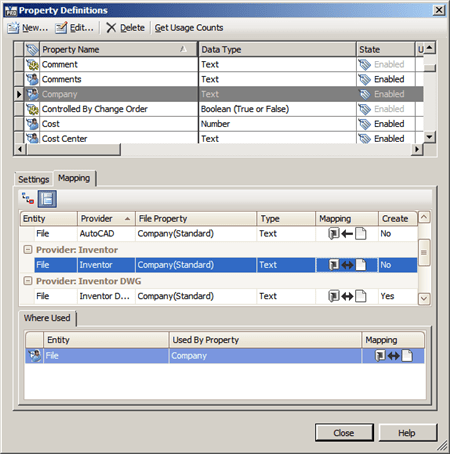
Mappings between content source properties and UDPs have a direction component. You can have mappings from content to UDP, or from UDP to content, or bi-directional mappings. Not all properties support all 3 mapping types. The provider decides which mappings are supported. When writing to content, there is a "create" option which means the provider can create the property in the file if the property does not already exist. If the value is NO, the provider will only update an existing property.
| Mapping Type | What it means for files |
| Content -> UDP | When a file is versioned, the file property value is copied to the UDP value. |
| UDP -> Content | When a "writeback" operation occurs in Vault, the UDP value is written to the file. This process creates a new file version. |
| Bi-directional | UDP is updated with a new file version and the content property is updated on writeback. |
Setting up a mapping
In order to set up the mapping, you must have a file that contains the content source property you want to map. In Vault Explorer, you select the file, which can either be in Vault already or on your local disk. Next, you are presented with the possible properties that you can map to. Once you select the file property, you can choose the direction of the mapping.
When you click OK, Vault updates the UDP with information about the mapped content source property.

You should also notice that A) you can have several providers mapped to the same UDP and B) each mapping is independent of the other mappings. A given file will map to 1 and only 1 provider, so there is no danger of conflict.
Monikers
This is a good time to talk about monikers. A moniker is a string that the provider uses to locate the property. Outside the provider, the moniker is just opaque metadata. For example, "15!{D5CDD502-2E9C-101B-9397-08002B2CF9AE}!nvarchar" is the moniker that the Inventor provider uses to locate the Company iProperty. That string is meaningless to you and me, it is meaningless to Vault and it is meaningless to the other providers.
The only thing that Vault does with the moniker string is to store it with the mapped UDP. Whenever Vault needs to read or write a content source property, it passes the moniker in to the provider so that it can locate the correct property.
Coming up…
An article on item properties, followed by an article on common workflows (with sample code).


Leave a Reply