
Project Thunderdome 2013

Update:  Click here for the 2014 version

New and improved for Vault 2013, Project Thunderdome is here.  Based on user feedback I re-designed the entire app.  Things should be much more intuitive and easy to use this time around.  The features are basically the same, but different in every possible way.

If you have no idea what Project Thunderdome is, sit back and strap yourself in.  You are about to get Thunderdomed….

There, you just got Thunderdomed.  If you feel exactly the same as before, that means it’s working!

If you can't access YouTube, here is the video for download.

Requirements:
Vault Workgroup/Collaboration/Professional 2013

Click here to download application
Click here to download source

Click here for the 2012 version


Features:

  • Backup user settings – A quick way to zip up all your Vault user-settings.
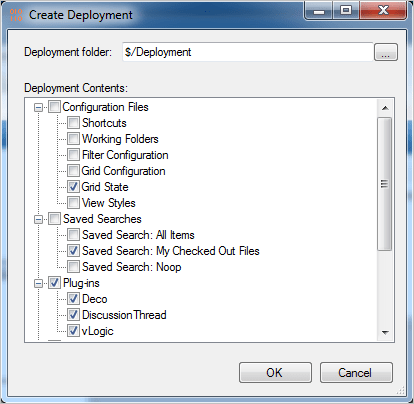
  • Create admin deployments – Select the components you want to deploy and they will be pushed to all other users with Thunderdome.
    Components include: User settings, saved searches, plug-in, DECO files, and vLogic scripts.
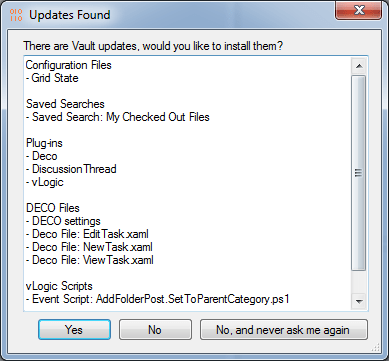
When an update is ready, users see something like this when they log into Vault Explorer.
 

As with all the samples on this site, the legal disclaimer applies.


Comments

19 responses to “Project Thunderdome 2013”

  1. Well done, great app!
    Be ready for new wave of feedback!

  2. Sorry but my first question is not about the projesct itself:
    The “My Checked Out Files” … i don’t think there is any sense to give users a list of files checked out by administrator, right?
    Thus it is probably about some universal search that returns a list of files checked out by ACTIVE user, right.
    If so then you probably need to share how to set up such a search without using “Prompt for value” option, please.

  3. Doh!
    The search does check for all files checked out by “Administrator”. It’s probably not something you would want to push out. I wasn’t really focusing on that when I made the video.
    I don’t think there is a way to set up a saved search that searches for your checked out files without prompting or hard-coding a user name.

  4. FYI me again got no e-mail notification about your answer here (something is wrong with the blog settings or I shouldn’t be expecting notifications).

  5. Hmmm. I’m getting alerts on my side, and I can see your email address from my blog admin dashboard.
    I suggest checking your junk folder. If it’s not there, check with the TypePad team.

  6. …They told only TypePad-accaounted users will get notifications. I wasn’t. Now I’m TypePad-accaounted…

  7. TypePad HTML Email
    Testing.
    You should see this message in your inbox.
     

  8. Great! Problem is solved. Thanks.

  9. Max Bodnar Avatar
    Max Bodnar

    Hi Doug
    Great app but would be more usefull if the grid config settings would also apply to not just the main grid, but the History, Uses and Where used tab
    it doesnt appear to retain the custom columns for these tabs, any plans to include these as well?

  10. The app is “200% must have”.
    Question: I see it supports no 3rd party apps, right?
    Let say I’d like all our users have “My checked out files” installed (not only installed but also configured to show a list of files checked-outed by user on his log-out). But Thunderdome doesn’t list the app in Plug-ins section while it lists “Watch folder”.
    Doug is there anything me or you can do about it?

  11. Doug, sorry, i’ve again forgotten to sign in as typepad-ed user. Please answer to this post (if any). Thanks in advance.

  12. Thunderdome only deploys apps signed with known keys. I did this deliberately to avoid interference with the App Store. For example, if somebody is charging $5 per download, they probably don’t want Thunderdome automatically deploying it.
    If an app wants to be recognized by Thunderdome, it needs to be signed with Thunderdome.snk, which is included with the source code. See the readme for more details.

  13. So much I’d like Project Thunderdome (PT) to do…
    A. Ban users to spoil the saved searches “injected”.
    B. What about client Updates (in Inventor we used to call them service packs) could updates be injected with PT?
    BTW, we are going to:
    1. Dub PT to office domestic language (all messages bi-lingual).
    2. Remove button “No and never ask me again”. As alternative it worth to unistall Vault Explorer and close the access if the button is pressed (I as admin don’t want to privide any support to users that neglect my recommendations).

  14. It sounds like you are writing your own version of Thunderdome based on my source code. That’s fine with me.
    There are a couple of things I like people to do in these cases:
    – Change the name of the app (which it looks like you are already doing)
    – Remove Autodesk copyright info
    – Don’t use the orange “010” icon
    Thanks

  15. Doug, Of course we will complete all your three requirements.
    But what about my questions A and B?

  16. If you are talking about an unmodified Thunderdome, A and B are both no. However if it’s ever decided that Thunderdome should be built-in to Vault, then these would be good features to consider.
    If you are building your own ‘Dome, then B is definitely possible. A will require some creativity, but it’s also doable.

  17. I suggest replacing “OK” button on the “Exit Required” window with TWO buttons “Exit now” (default) and “I’ll close client later”.

  18. It’s a good suggestion, but there is no API support for shutting down Vault Explorer. So it’s up to the user to exit the application.

  19. Doug,
    I would like to see the ability to save the settings for the grid layout in the lower window as well (History, uses and where used tabs). Also any possibility for this to be available to the Vault Basic user?
    Thanks

Leave a Reply to Doug RedmondCancel reply

Discover more from Autodesk Developer Blog

Subscribe now to keep reading and get access to the full archive.

Continue reading