
Parts List Tab 2013

Parts List Tab received the most votes when I asked which apps I should update.  Keep in mind, this is a straight port from the Vault 2011 version.  I didn’t have time to add new features.

For those of you not familiar with the app, it creates a new file tab.  When you select a file that has Item information, the tab displays the parts list from the Item BOM.
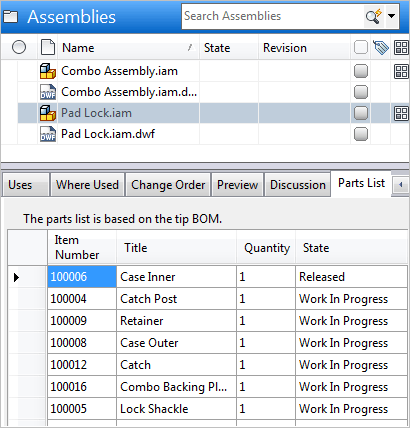
Thanks again to Jim McMullen for writing the app.

Requirements:
Vault Professional 2013

Click here to download application
Click here to download source

As with all the sample apps on this site, the legal disclaimer applies.


Comments

4 responses to “Parts List Tab 2013”

  1. Roman Kudryavcev Avatar
    Roman Kudryavcev

    Doug and Jim , it is nice app! Does it is possible to create BOM’s for Plant 3d, Revit , Architecture files/projects via Vault?
    May be Autodesk will plan to realize this opportunities?

  2. BOM data is set by the CAD plug-in. If the BOM data is not being set, you should go to the Idea Exchange and suggest it as a feature.
    http://forums.autodesk.com/t5/Autodesk-Vault-IdeaStation/idb-p/2

  3. Roman Kudryavcev Avatar
    Roman Kudryavcev

    thanks, Doug

  4. Hi Doug,
    Is there an update for Vault Professional 2014 or 2016
    Nice app
    Best regards,
    Pedro

Leave a Reply

Discover more from Autodesk Developer Blog

Subscribe now to keep reading and get access to the full archive.

Continue reading