Setting your project to .NET 3.5

Update: For Vault 2013, we moved over to .NET 4.  See this post for more details.  The rest of this article refers to Vault 2012.

We don't support .NET 4.0 extensions for Vault Explorer or Job Processor.  The problem is that Vault Explorer and Job Processor are 3.5 applications.  And a 3.5 application cannot load a 4.0 DLL.  In these cases, you will usually see an error message like, "Could not load file or assembly 'Foo' or one of its dependencies. The system cannot find the file specified."

To fix, you need to switch your compile settings to .NET 3.5 or earlier. 

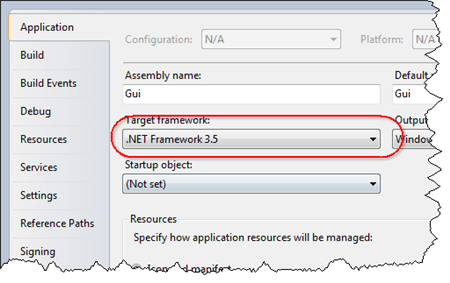
To change the settings is a VS 2010 C# project, go to the Application tab in your project settings and change the Target Framework.
 

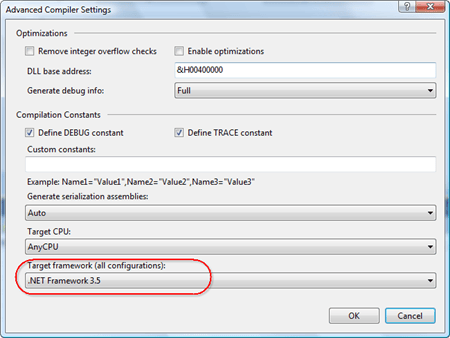
To change the settings is a VS 2010 VB.NET project, go to the Compile tab in your project settings and click the Advanced Compile Options button.  In the dialog that pops-up, change the Target framework.


Comments

4 responses to “Setting your project to .NET 3.5”

  1. cadfish1 Avatar
    cadfish1

    Please add this to your check list

  2. It’s already on the list, but I added a link to this page. Thanks.

  3. Hello,
    When i want use this extension, i have this error when i click on the main form to modify the access right:
    “Object reference not set to an instance of an object”.
    I have Vault Pro 2012 SP1. I have test the extension folder with your TestLoader.exe and the result is good. I don’t have the menu in Tools. I have already try to delete the folder and rebuilt the solution with the same error.
    I want manage the folders access for groups and users.
    Thanks for your help.
    Olivier

  4. I think you posted to the wrong article. Which extension are you trying to get working?

Leave a Reply

Discover more from Autodesk Developer Blog

Subscribe now to keep reading and get access to the full archive.

Continue reading