
Extension Deployment Checklist

I'm seeing a lot of people having issues loading their Vault 2012 extension, so here is an updated deployment checklist.  The 2011 version of the checklist is here

For all extension types (custom commands/tabs, job handlers, event handlers):

  • Is your project using .NET 3.5 or earlier?
    (.NET 4.0 is not supported for extensions. Click here for instructions.)
  • Are you using Vault Workgroup, Collaboration or Professional?
    (extensions are not available in base Vault)
  • Did you deploy to %ProgramData%\Autodesk\Vault 2012\Extensions\[myExtension]?
  • Did you include a .vcet.config file?
  • Does the .vcet.config file have the correct Assembly name?
    (it should be your DLL name without the ".dll" at the end)
  • Does the .vcet.config file have the correct Extension Type?
  • Does your extension have values set for AssemblyCompany, AssemblyProduct, AssemblyDescription, ApiVersion and ExtensionId assembly attributes?
  • Do you have "4.0" as the attribute value for ApiVersion?
  • Does your IExtension, IJobHandler or IWebServiceExtension implementation have a public default constructor?
    (a default constructor is a constructor with no arguments, if no constructor is in the code, the compiler will create one)

Custom commands only:

  • Did you reset your menus in Vault Explorer?
    (either delete Menus.xml or right-click on the menu bar and select Customize)
  • Do your CommandSite objects have non-empty Label values?
    (the label can't be null or empty, even if you are not displaying a sub menu)


Testing the load:

If you are still having trouble, I wrote a test loader that you can use.  It will display more detailed information about why you extension is not loading.
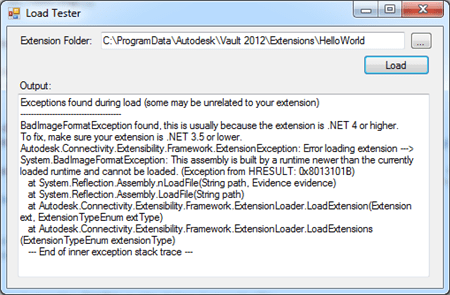
Click here to download the utility

The compiled EXE is in the bin\Release folder.  The source code is provided too.  It makes use of some loader utilities in Autodesk.Connectivity.Extensibility.Framework.


Comments

10 responses to “Extension Deployment Checklist”

  1. Per Jonsson Avatar
    Per Jonsson

    Hi!
    The problem with the validation check (we are talking JobServer) is that it checks every file in the directory. Autodesk should change it to just check the mentioned file in the .vcet.config-file and not any relatives. I’ve been struggling the whole day and the reason was a dll from a third party supplier that I needed.
    By the way, thanks for your program, it helped me in the right direction, after 8 hours I feel relieved.
    /Per

  2. The .NET framework is what is pulling in all the referenced DLLs. I don’t think JobProcessor.exe itself is trying to load every file in the directory.
    Anyway, good to know things are working for you now.

  3. ” Is your project using .NET 3.5 or earlier? “…
    How can I check this?
    Tom

  4. Cool, thanks

  5. Mike Collins Avatar
    Mike Collins

    Hi Doug,
    I am trying to build the PropertyPageSample app. I am getting the “Error loading extension PropertyPageSample” error on starting Vault.
    I tried running the Load Tester utility, and it said that it could not find the Autodesk.Connectivity.Extensibility.Framework version 16.0.56.200. I checked my project References and I had that DLL, but it was version 16.1.58.0.
    Is that really the problem? How should I approach fixing it?

  6. Hotfixes should not affect API applications. They don’t have strong names, so you should be able to swap in different versions without causing errors.
    Anyway, post your app to the Vault customization discussion group and I’ll take a look:
    http://forums.autodesk.com/t5/Autodesk-Vault-Customization/bd-p/301

  7. Mike Collins Avatar
    Mike Collins

    Ok thanks. I have created a post there.

  8. Iwan van Wijk Avatar
    Iwan van Wijk

    Hello Doug,
    Are you making a test loader for Vault 2013? I have used the test loader for Vault 2012 a couple of times.

  9. Vault 2013 has an error logging feature. So, I’m hoping that a 2013 test loader isn’t needed.
    http://justonesandzeros.typepad.com/blog/2012/07/extension-loading-error-logging.html

Leave a Reply to TomCancel reply

Discover more from Autodesk Developer Blog

Subscribe now to keep reading and get access to the full archive.

Continue reading