
DECO – Custom UI without Custom Code

Update:  The Vault 2014 version of DECO is now available.

Take one last good look at yourself in the mirror…because I’m about to rock your face off.  Introducing Deco, the Design Editor for Custom Objects.  Deco lets you define your own custom object UI without the need for custom code.

Deco allows you to define your own dialog when creating a new custom object.  It allows you to define your own edit dialog.  And it allows you to have a custom tab for viewing your custom object data.

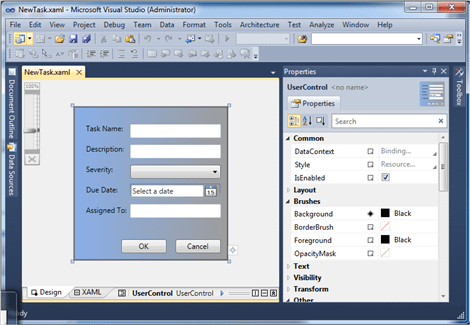
You start out by creating your user interface using Visual Studio:
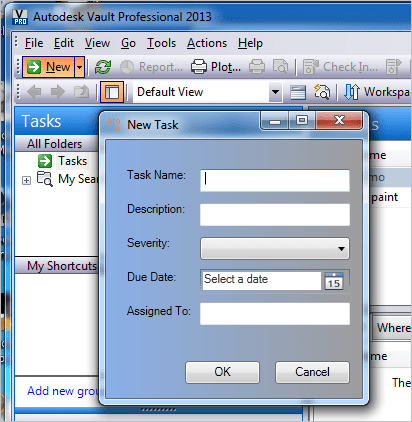
Next, you hook it in to Vault Explorer:
Deco can’t do everything, however.  Complex UI will still need custom programming.  But Deco should hit most of the common cases.  Specifically “property page” type functionality, where you want to display or edit the properties on a single object.

It’s probably best if you watch the how-to video on my Youtube channel. 

In other news, I now have a Youtube channel.  There is not much up there right now, but I’ll be porting over most of the videos from this blog.

For those of you blocked from Youtube, here is a download link:  http://justonesandzeros.typepad.com/Videos/Deco/Deco.wmv


Requirements:

Click here for the application
Click here for the source code


Current limitations:

  • Custom Objects only.  No support for files, folders, items, and so on.
  • Vault Professional 2013 only, since that’s the only product with custom objects.
  • Vault data can only be hooked to TextBox, CheckBox, ComboBox an DatePicker controls.
  • The XAML files and Settings.xml need to be distributed to all clients in order for them to see the custom UI.  This issue will be addressed in the next release of Project Thunderdome.

As with all the samples on this site, the legal disclaimer applies.


Comments

19 responses to “DECO – Custom UI without Custom Code”

  1. Oh… I soooo love this new feature.. Thanks Doug! You just made custom objects perfect.

  2. This is great and should become integrated into the product. If this was available for Files and Folders (looking at your source). It would offer a “Data Card” like option so many other products have. As mentioned above, this really makes custom objects worth it. Great Work.

  3. Doug, which version of Visual Express do we need to download. That link takes us to the site and there are several versions available. Do I want the Web Developer?

  4. I think they will all work. I suggest either the C# or VB version, depending on which programming language you prefer (if any).

  5. Doug,
    Will this not work if your Vault is on a network drive? I’ve created a UI, configured it as shown in your video, and Vault can’t see the .xaml files.

  6. NEVER MIND!! Got it!

  7. Hello Doug! Thank you for Deco.
    In my view you created a great application and it helped me to create my own solution based on it.
    At present I have an issue with Deco. Let me show it and ask a piece of advice. Thanks in advance.


  8. Nice video. Unfortunately DECO doesn’t have support for links to other objects. So if you want to associate your Task object to a Contact object there are a couple of options:
    1. Paste contacts into the “contains” tab for the Task.
    2. Write a custom dialog using .NET programming instead of DECO.
    One more thing. On the tab view, date values look better when you use a TextBox. The DatePicker control doesn’t do much since tabs are read only.

  9. Hi Doug,
    is it possible to populate a combobox with data from vault – e.g. a list of equipment that users can update.
    The idea is to use a combobox to ensure consistency of data but allow users to add to the list as required. It would be impractical to modify the design every time a list needs to be updated. Any other way of achieving this, maybe via config files?
    thanks

  10. I’m not sure if this is a DECO question or not.
    If a property has a list of values associated with it, then you can use a combo box for that property in DECO. But that is the only type of data that DECO can show in a combo box.
    If this is a general Vault API question, then you can build your own UI and program a combo box to behave however you want.

  11. Paul Coleman Avatar
    Paul Coleman

    Hi Doug
    I’ve found the data from vault populates in a drop down list for a combo box automatically if there is a list setup in vault.
    I do have a problem though. It seems that it only selects the list items added in vault. I have selected IsEditable in the xaml combo box?
    When inputting the data manually in the deco form it doesnt update.
    Any help would be great.
    Thanks
    Paul

  12. pacdraftingservices@gmail.com Avatar
    pacdraftingservices@gmail.com

    Hi Doug
    I’m having difficulties getting the checkbox to work.
    Can it be tagged to a boolean vault property?
    Thanks Paul

  13. I’m seeing the same thing. It’s probably a bug. What version of DECO are you using?

  14. Hi Doug
    Thanks for the reply.
    Currently using 2013. We won’t be upgrading until about September.
    Regards
    Paul

  15. Paul Coleman Avatar
    Paul Coleman

    Sorry to bother you Doug.
    Any news on whether this will be fixed?
    Thanks
    Paul

  16. Are you talking about the boolean issue or the combo box issue?
    Regarding the boolean issue, I got it working on my Vault. The reason it wasn’t working for me before is that I just created the boolean property and tried to use it with DECO. You need to restart Vault if you want DECO to pick up any new properties.
    Regarding the combo box issue, I have no plans to hotfix.

  17. Sorry the Boolean issue.
    Can you briefly show me what you did to get it working. Did you put a custom property in vault as a Boolean? Then add a checkbox in studio and tag the vault property?

  18. Paul Coleman Avatar
    Paul Coleman

    Hi Doug
    I have the boolean working. Thanks.
    Another question…sorry to annoy you.
    Can a text box be linked to a number property in vault?
    Regards Paul.

  19. Yes, you can link a text box to a number property.

Leave a Reply

Discover more from Autodesk Developer Blog

Subscribe now to keep reading and get access to the full archive.

Continue reading