


A while back, I showed you how to write a custom column for your VDF grid. But what about a custom row? Can it be done? If the answer was No, this would be a pretty short blog article, so the answer is Yes!
Just like with custom columns, this data is client-side only. It’s not saved to the server or shared with other Vault clients.
Let’s just dive right in to code again. For this example, I’ll put a custom row in the grid followed by a standard File row.
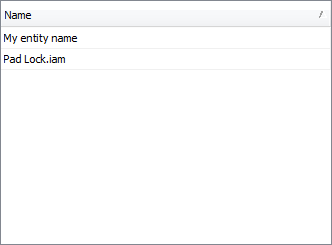
If you already know how to populate the VDF grid with Entity objects, you are more than halfway there. The only new steps are creating the EntityClass and Entity class. Those are two different things, by the way.
EntityClass is the type of entity. For example, File, Folder, Item, Change Order or Custom Object. For this example, let’s create our own EntityClass. You can easily do this by calling AddInternalEntityClass. You pass in a unique ID and display name, and you will get back an EntityClass of you very own. Although this is a custom entity class, it’s not a Custom Object. Custom Objects are stored on the server.
|
// create our entity class. |
Now let’s create our Entity class, which we do by deriving from IEntity. I’m just going to create something simple for demonstration purposes.
|
classMyEntity : IEntity { public MyEntity(EntityClass entityClass) { m_entityClass = entityClass; }
privateEntityClass m_entityClass; publicEntityClass EntityClass { get { return m_entityClass; } }
publiclong EntityIterationId { get { return -1; } }
publiclong EntityMasterId { get { return -1; } }
publicstring EntityName { get { return"My entity name"; } }
publicbool IsCloaked { get { return false; } }
publicLink LinkInfo { get { return null; } set {
} } } |
Now we are free to create any number of MyEntity objects and place them in our grid, just like any other IEntity. Most of this code just involves setting up the grid. Only a couple of lines are related to our custom entity.
|
// create our entity objects. MyEntity myEnt = newMyEntity(myEntClass);
// Let’s grab a file too. File file = m_conn.WebServiceManager.DocumentService.FindLatestFilesByPaths( FileIteration fileIter = new FileIteration(m_conn, file);
// standard setup for a grid control string persistanceKey = "ServiceAttributeTest.PropsTest"; VaultBrowserControl.Configuration config = newVaultBrowserControl.Configuration(
// Set the Name property as the grid’s only column. config.AddInitialColumn(PropertyDefinitionIds.Server.EntityName); config.AddInitialSortCriteria(
ViewVaultNavigationModel viewModel =
// Add in the File and MyEntity objects as the grid content List<IEntity> content = newList<IEntity>(); content.Add(fileIter); content.Add(myEnt);
// Set the content and show the grid viewModel.SetContent(content); m_vaultGrid.SetDataSource(config, viewModel); m_vaultGrid.Refresh(); |

Leave a Reply