

I know that most people don't have Vault 2011 yet, but the new API's are just too cool for me not to use. So I present to you my first sample app for Vault 2011.
Overview:
Set Revision iProperties takes the revision history of a file and sets them as custom iProperties on an IDW or Inventor DWG file.
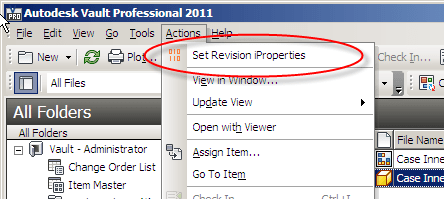
Select the drawing and run the command from Vault Explorer

Custom iProperties are added to the Inventor file
Requirements:
Vault Workgroup/Collaboration/Professional 2011
Inventor 2011
Click here to download the application
Click here to download the source
Installation:
This utility is a command extension to Vault Explorer, and there are a few steps you need to go through to deploy.
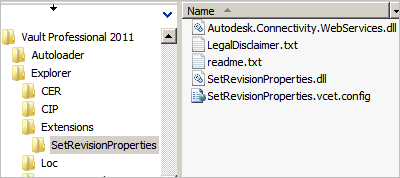
- Locate the Vault client install folder. (ex. C:\Program Files (x86)\Autodesk\Vault Professional 2011)
- Navigate to the Explorer sub folder.
- Create an "Extensions" sub folder.
- Create a "SetRevisionProperties" sub folder under Extensions.
- Place all the files from the ZIP in the SetRevisionProperties folder.
- Start up Vault Explorer and go to a folder. You should see the "Set Revision iProperties" command under the Actions menu.
- If the command is not in the Actions menu, you may need to place it yourself using the Customize feature of the menu bar. Right click and select Customize. Then go to the Commands tab and select the Tools category.

Enjoy.
Leave a Reply