

The way Vault handles file properties is… interesting. There are good reasons for the way things work, but the mechanics aren't very apparent and first. So let me take some time to go over the concept of File properties.
Properties that Live Inside the File
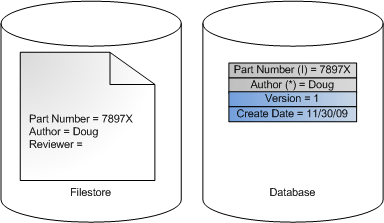
Let's start out with the basics. We'll take a look at a file on disk, no involvement with Vault. This file probably has properties inside of it. If it's a CAD file it has things like Part Number and Author. The arrangement of these properties may be different for different file types, but the concept is the same: name / value pairs within the file.

Adding to Vault
Now let's add that file to Vault. What happens on the server side is that Vault extracts the properties from the file and stores it in the database. There are still properties inside the file, of course. Vault stores a perfect copy of the file on its server.

Vault doesn't deal with those properties inside the file, however. It is much easier to work with the copies in the database. This allows for quick retrieval and searching. The API refers to these properties as Derived Properties because they are just copies from another source. These types of properties cannot be edited since, again, they are meant to be a copy of the file's properties. You need to check out the file, edit it, and check it back in in order to change this property value.
The convention is to use the suffix (I), (A) or (*) in the display name for these types. They stand for Inventor, AutoCAD and "other" respectively.
System Properties
The Vault system automatically adds another set of properties related to Vault data, such as the check-in time and who added the file to Vault. The API refers to these types as System Properties. Again these property values cannot be edited directly since the Vault system assigns these values.
User Defined Properties
This type does not show up in base Vault. All other versions have property types that allow the value to be directly edited. These are usually called user defined properties or UDPs. However the API calls these Custom properties. This is the only type that allows values to be edited. It's also the only type that allows property definitions to be added or edited or deleted.

It's possible to map a custom property to a derived property. There are various uses for these maps. For example, you can assign a value to a custom property then perform a writeback operation, which creates a new version of the file with the updated property value.

Moving Forward
This is just a first look at file properties. I'll be going into more detail in future postings. If there is something specific you want me to go over, let me know in the comments section below.


Leave a Reply